
Last updated on March 29th, 2026 at 09:34 am
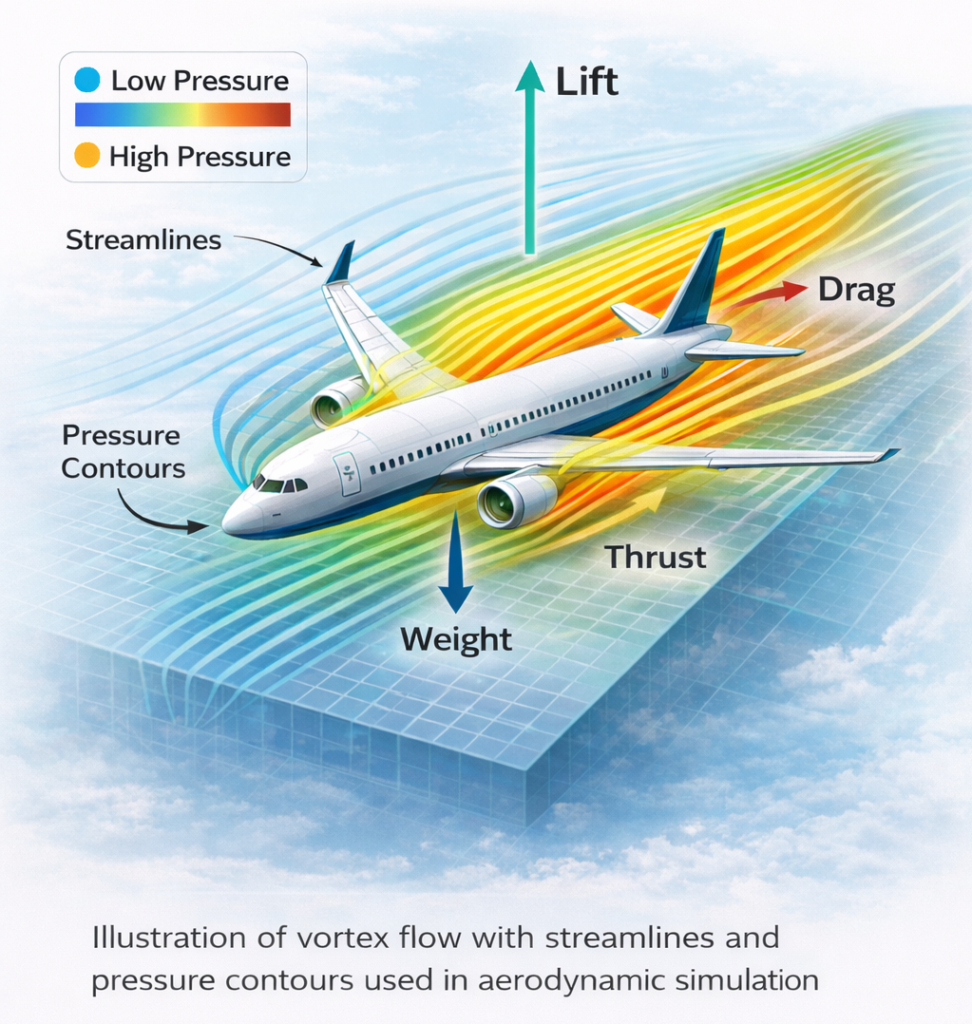
Aerodynamics in flight simulators can feel complex at first, but you don’t need deep engineering knowledge to understand what’s happening.
When I first started using simulators, I didn’t pay much attention to airflow or pressure—I was mainly focused on just flying. Over time, I began to notice that small changes in speed, angle, and control inputs were all connected to basic aerodynamic principles.
I experienced this in both Flight Simulator X and X-Plane 11, but the difference became more noticeable in X-Plane 11. The aircraft felt more responsive, and I could feel how each input affected the plane’s movement, especially during approaches and landings. In comparison, FSX felt more limited in how clearly those aerodynamic effects came through.
This guide breaks down how aerodynamics actually works inside flight simulators in a simple, practical way, so you can understand what’s happening without getting lost in technical details. If you’re just beginning your journey into flight simulation, I recommend checking out Getting Started With Flight Simulation: A Step-by-Step Guide to build a solid foundation before diving into aerodynamic concepts.
Fundamental Principles of Aerodynamics

Aerodynamics covers the study of how air moves around objects and the forces involved. It is a subject that explains how wind affects anything from an airplane wing to a car body. Understanding these fundamentals is a strong starting point for anyone using simulators to explore aerodynamic behavior.
The basic understanding of aerodynamics revolves around how air flows and exerts forces. This science explains the behavior of air in motion, allowing for insights into lift, drag, thrust, and weight. These forces interact in ways that predict how vehicles perform under real conditions.
There are four primary principles in aerodynamics that are essential to understand. They include:
- Lift: This is the upward force that counteracts gravity. It occurs when air moves over a surface so as to reduce pressure on the top side, helping objects stay aloft.
- Weight: This is the downward gravitational force on an object. Weight must be overcome by lift for flight to occur.
- Thrust: Thrust is the forward force provided by an engine or propeller that propels the object. In simulations, thrust is critical for modeling how objects move through the air.
- Drag: Drag is the resistance an object encounters as it moves through the air. Aerodynamic simulations often measure drag to improve energy efficiency and performance.
Based on beginner-friendly guidance from NASA, understanding these aerodynamic principles helps build a solid foundation for exploring aerodynamics using simulation software and guides engineers in optimizing real-world design and performance.
How Aerodynamic Simulations Work
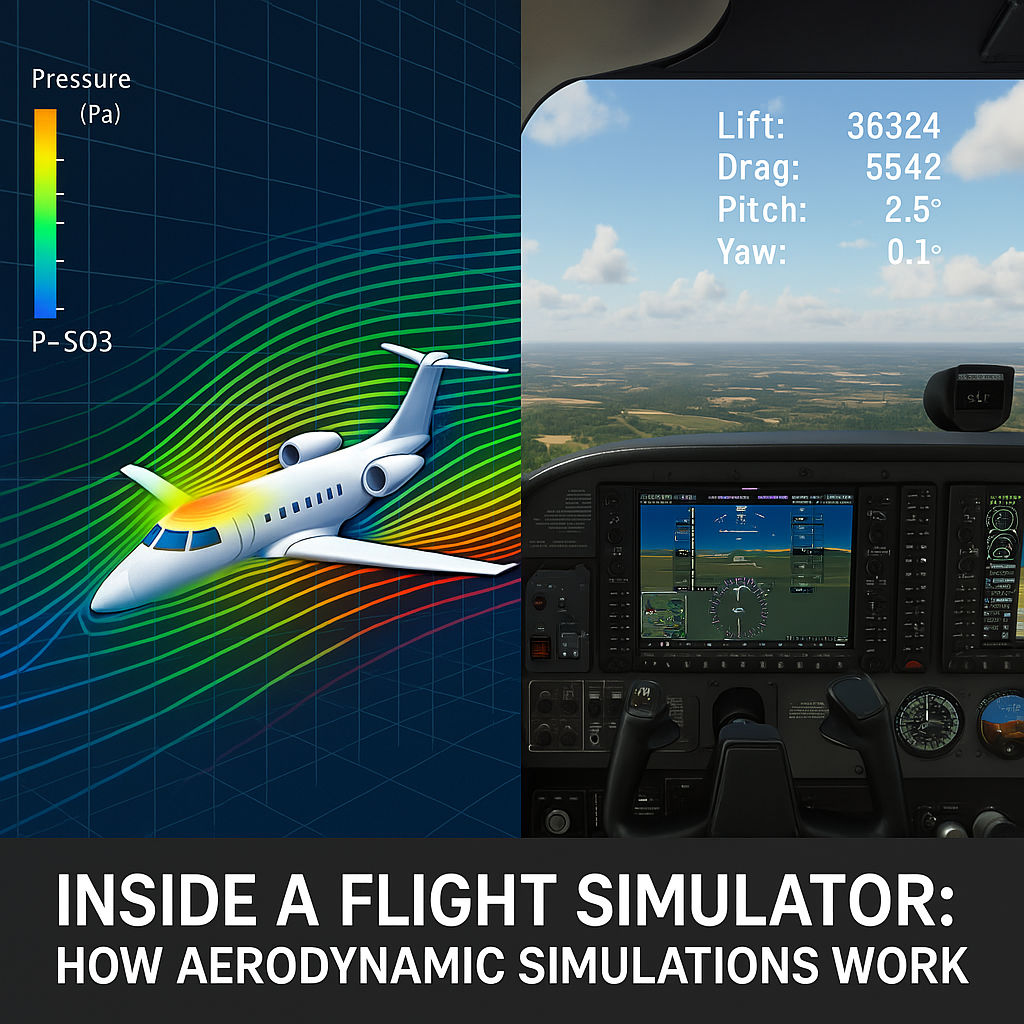
Aerodynamic simulations are computer models that replicate the behavior of airflow around objects. These simulations are often used to test aerodynamic theories without the cost or risk of real-world experiments. They’re built on mathematical models and algorithms that solve complex fluid dynamics equations, making them a powerful tool for understanding airflow and aircraft behavior in a virtual setting.
Tools like ANSYS CFD are commonly used in industry to simulate fluid flow and aerodynamic performance with professional-level accuracy.
At the heart of aerodynamic simulations is computational fluid dynamics (CFD). CFD uses complex calculations to predict airflow, pressure distribution, and the resulting forces. This method divides a physical space into many small cells, solving equations in each cell to approximate overall behavior.
Several factors affect the performance of a simulation. These include the resolution of the grid, the boundary conditions, and the assumptions made in the model. Each of these plays a role in ensuring that the simulated results closely mimic real-world physics.
The process begins with setting up a digital model of the object to be studied. The computer then creates a digital wind tunnel where air is modeled as a fluid. The simulation iteratively computes physical forces such as lift and drag across the grid. The outcome helps engineers analyze and refine designs before actual production begins.
This process allows for safe, repeatable tests of various conditions without the risks associated with physical experiments. I have seen how small changes in the digital model can result in significant improvements in performance when applied in the real world. If you’re setting up your own simulator environment, How To Set Up Your First Custom Flight Simulator walks you through the key components needed for a solid setup.
🎬 Watch Aerodynamics in Action: Helpful Video Explainers
If you’re a visual learner like me, seeing aerodynamic principles in motion can make all the difference. Below are some hand-picked YouTube videos that do a great job of breaking down complex ideas like lift, drag, and CFD in a way that’s both engaging and easy to follow. Whether you’re just starting or want to reinforce your understanding with real-world examples and simulations, these videos bring the science of aerodynamics to life.
Real-Time Aerodynamics in X-Plane 11 (My Experience)
While flying over Colorado, I discovered a built-in feature in X-Plane 11 that lets you visualize airflow directly on the aircraft. You can enable it by going to the View menu, then scrolling down to the aerodynamic visualization options, or by pressing Ctrl + M repeatedly until the streamline view appears.
Once enabled, I started seeing colored streamlines flowing over the aircraft. I first tested this using the Cessna 172, and later with the Boeing 737-800.
In the Cessna 172, the airflow appeared smooth and clearly followed the wings during stable flight. Small changes in pitch or turning caused noticeable changes in how the streamlines moved, which made it easier to understand how control inputs affect airflow.
When I switched to the Boeing 737-800, the airflow behavior felt more stable and less sensitive compared to the smaller aircraft. The streamlines still changed with control input, but the effect was more gradual, which reflects how larger aircraft behave in real conditions.
Seeing these airflow patterns in real time made aerodynamics much easier to understand. Instead of just reading about lift and drag, I could actually observe how airflow reacts while flying.
Starting with Aerodynamic Simulations
Many individuals new to aerodynamics might wonder how to begin using simulation software effectively. I suggest starting with platforms that are user-friendly and offer robust tutorials. Such tools provide pre-set models and adjustable parameters that help ease the learning curve. Beginner-focused guides like SimScale’s introduction to CFD simulation are especially useful for showing how aerodynamic concepts translate into airflow visualization, pressure distribution, and force analysis within a simulation environment.
When choosing a simulation tool, consider ease of use, support documentation, and compatibility with your computer hardware. Free and open-source software options are often available. They let you explore the basics without significant initial investment.
Along with the tool choice, understanding the fundamentals of aerodynamics remains central. Before getting into the software, I always recommend spending time reading up on aerodynamic theory. A clear grasp of the principles helps in setting up proper simulation parameters and interpreting results.
Simulation software lets you modify variables and visualize changes in the airflow. This trial-and-error process provides practical insight into how designs may behave in real life. It is a valuable method of learning that instills confidence in using simulations to predict performance accurately. For those new to these tools, Essential Software And Tools For Novice Pilots offers a helpful overview of beginner-friendly platforms that can complement your aerodynamic studies.
Common Challenges in Aerodynamic Simulations
One challenge with aerodynamic simulations is the difference between virtual results and real-world behavior, particularly when modeling complex airflow such as turbulence. Achieving realistic outcomes depends heavily on how the simulation is configured and the assumptions built into the model. Understanding these limitations helps users interpret results more accurately and avoid unrealistic expectations.
One challenge is ensuring that the numerical grid is fine enough to capture the necessary details while not overloading the computer with excessive data. A balance between resolution and computational efficiency is very important. In some cases, simplifying the model too much might result in less accurate outcomes.
Another challenge is the accurate simulation of turbulent systems, which I explore in more detail in The Role Of Turbulence In Realistic Flight Experiences. Turbulence involves chaotic changes in pressure and flow velocity, which can be hard to model using standard numerical methods. Advanced simulation packages include specialized turbulence models to address this, although they require additional computing power and expertise.
Boundary conditions can also be a hurdle. These conditions define how the simulation handles airflow at the edges of the model. Incorrect settings can lead to unrealistic outputs. I have learned to pay careful attention to how these boundaries are configured, as they play a significant role in the overall results.
Finally, validating simulation results with physical data is always an important step. This comparison verifies that the virtual model reflects reality as closely as possible. Testing under known conditions and tweaking simulation parameters can help bridge any gaps between simulation and real-world performance.
Advanced Considerations for Simulation Use
This section covers techniques I have found useful when I want to expand the scope of my simulations. Beyond the basics, more advanced practices ensure higher accuracy and increased realism.
One technique involves refining the mesh or grid used in the simulation. A denser grid provides more detailed results, especially near surfaces where air changes speed more rapidly. However, a denser grid requires more computing resources. I have found that adjusting the mesh resolution in critical areas strikes a good balance between precision and practicality.
Another point to consider is the choice of turbulence models. Depending on the simulation, selecting a model that best fits the flow conditions can be a game changer. Experimenting with different models helps in identifying the most suitable one for a particular design scenario.
Using iterative testing and validation cycles is also important. While I didn’t personally run formal tests, it’s common practice in the flight sim community to explore how small changes in conditions can affect aerodynamic performance. This kind of trial-and-error approach often uncovers subtle factors that influence how an aircraft behaves—and those insights can lead to gradual but meaningful improvements in your sim experience.
Integration with other simulation tools also plays a role. For instance, coupling aerodynamic simulations with structural analysis software creates a more all-in-one view of how a design will hold up under real operating conditions. I have often found that using simulations in tandem can reveal flaws or opportunities that might not be evident when using one type of analysis alone.
The use of parametric studies is another advanced method. This approach involves systematically varying input parameters and analyzing their effects on the output. Such studies provide a clearer picture of how design factors interrelate. They are particularly useful in optimizing specific aspects of performance, such as minimizing drag while maintaining sufficient lift.
The Fundamentals: Key Concepts in Aerodynamics
At its core, the fundamentals of aerodynamics deal with the behavior of air as it flows around objects. I find that a few core ideas tie the concept together.
First is the concept of the boundary layer, the thin region of fluid directly in contact with the surface of an object. The properties of the boundary layer affect drag and heat transfer, which can in turn influence the overall efficiency of designs. I have seen this concept highlighted in many simulation studies, as it is key to understanding aerodynamic performance.
Second is the importance of pressure differentials. According to Bernoulli’s principle, an increase in airflow speed is accompanied by a decrease in pressure, a concept that underpins lift generation on curved surfaces. You can read a clear explanation on SKYbrary.
Third, I consider the role of fluid viscosity. The internal friction of the fluid affects how layers of air slide past one another, impacting both drag and the transition between laminar and turbulent flow. Grasping how viscosity influences the simulation leads to better setups and more realistic results.
Finally, I focus on the impact of compressibility in high-speed flows. Under conditions where the speed of air approaches or exceeds the speed of sound, compressibility becomes a critical factor. Many simulation tools now incorporate models that account for changes in air density, which is important for accurate predictions in high-speed scenarios. Not familiar with all the terminology? My Glossary Of Flight Simulator Terms For Beginners can help clarify key aerodynamic and simulation terms.
Additional Insights on Aerodynamic Simulation
Over time, I have accumulated many observations that further illuminate the intricate world of aerodynamics. One significant aspect is the iterative nature of simulation work. Engineers frequently run multiple experiments with adjusted parameters until the digital model mirrors expected physical behaviors. This repetitive process is not only about tweaking numbers but also about understanding the interplay of design choices that affect both performance and safety.
Another valuable insight is the importance of visualization. Modern simulation software provides dynamic views of airflow, helping users see how pressure differentials and turbulent eddies form around physical structures. By analyzing color maps and flow lines, one can track down subtle patterns that may otherwise go unnoticed. These visual cues are essential for fine-tuning design elements and can lead to innovations that push projects to the next stage.
Moreover, collaboration between different disciplines plays a crucial role. When aerodynamic simulation teams team up with experts in materials science, structural engineering, and control systems, the results are transformative. This multi-angle approach often uncovers hidden opportunities for design optimization and tends to foster a better overall understanding of the product behavior. Engineers often share their findings through internal reports, workshops, and technical sessions, thereby setting off a cooperative cycle of improvement.
Furthermore, the adaptability of simulation platforms makes them an excellent tool for learning and development. Both beginners and experienced professionals can use these systems to experiment with radical design changes safely. Such experimentation, underpinned by reliable simulation data, helps in nurturing a culture of innovation and continuous improvement. Over the years, I have seen projects that started as simple simulation exercises eventually lead to breakthrough realizations in aerodynamics design.
Finally, the integration of simulation output with real-world testing forms a feedback loop where theory and practice continually inform each other. This feedback system not only helps in correcting initial misconceptions but also paves the way for future advancements. The combination of experimental data with digital modeling creates a robust platform for achieving design excellence. Once you’ve built some confidence in your setup, Building Confidence: Your First Virtual Takeoff And Landing can guide you through applying what you’ve learned in your first practical flight.
Frequently Asked Questions
Question: What is the basic understanding of aerodynamics?
Answer: Aerodynamics is the study of how air flows around an object and how that airflow affects movement. In flight simulation, this means understanding how your aircraft generates lift, how drag slows you down, and how thrust and weight balance each other in the air. Even a basic grasp of these forces helps explain why your aircraft climbs, turns, stalls, or descends the way it does inside the simulator.
Question: What are the 4 principles of aerodynamics?
Answer: The four main forces acting on an aircraft are lift, weight, thrust, and drag. In a simulator, these forces determine how your aircraft behaves during takeoff, cruise, and landing. Lift must overcome weight to climb, thrust must overcome drag to accelerate, and changes in these forces affect everything from stall behavior to approach stability.
Question: How do aerodynamic simulations work?
Answer: Aerodynamic simulations use simplified versions of computational fluid dynamics (CFD) to estimate how air moves around an aircraft. The simulator breaks the airflow into small sections, calculates pressure and force changes, and then turns those calculations into realistic aircraft responses—such as lift loss during a stall or increased drag when using flaps. While not as detailed as engineering software, home simulators still model airflow well enough to teach core aerodynamic behavior.
Question: What are the fundamentals of aerodynamics?
Answer: Fundamental aerodynamic concepts include the boundary layer (the thin layer of air touching the aircraft’s surface), pressure differences that create lift, viscosity that affects how smoothly air flows, and compressibility at high speeds. These ideas help explain why wings produce lift, why drag increases as you speed up, and why airflow changes shape during a turn or descent — all of which are represented in flight simulation.
Question: Why do different simulators model aerodynamics differently?
Answer: Each simulator uses its own physics engine and mathematical approach to airflow. Some rely on highly detailed flight models, while others use simplified aerodynamic tables. This is why the same aircraft may feel slightly different in MSFS, X-Plane, or Prepar3D.
Question: Why do small changes in an aircraft model affect simulation results?
Answer: Aerodynamics is sensitive to shape, angles, and surface details. Even minor adjustments—such as wing curvature, flap deflection, or weight distribution—can change how lift and drag are calculated. This is why developers fine-tune aircraft models repeatedly to achieve realistic behavior.
Question: Do I need engineering knowledge to evaluate aerodynamic behavior in a simulator?
Answer: Not at all. Understanding simple concepts like lift, drag, and airflow separation is enough to recognize why your aircraft climbs, turns, or stalls the way it does. Your simulator handles the complex physics in the background—you just observe the results.
Final Thoughts
I have found that a solid grasp of basic aerodynamic principles can be very useful when using simulators for design and testing. The application of these principles in simulation environments provides a cost-effective and safe way to explore design options. It helps in predicting how objects will behave under various conditions, whether in vehicle design, aircraft development, or even in industrial applications.
Iterative testing and thoughtful configuration of simulation parameters can lead to meaningful improvements in results. By experimenting with different models and comparing simulation output against reference or expected behavior, users can refine their understanding of how aerodynamic systems respond under varying conditions. Over time, the practical insights gained through repeated simulation work help support more informed decisions and more optimized designs.
This article covers the basics and advanced considerations of aerodynamics in simulators. I hope it helps you understand the main ideas and encourages further exploration of simulation tools. Whether you are an engineer, a student, or simply curious about the subject, there is much value in learning how digital models mirror the physical world.
Aerodynamic simulation has grown into an invaluable tool. It offers a practical window into complex physical phenomena and provides an accessible way to validate designs before building physical prototypes. I encourage you to experiment with your own simulations and take advantage of the deeper insights they can deliver.
With a methodical approach that combines fundamental principles with advanced simulation techniques, you can tap into the power of computational models to make informed decisions in design and optimization. I appreciate your interest in this topic and hope that the explanations provided here give you a clear pathway into the exciting world of aerodynamic simulations.
Have you tried running your own aerodynamic simulations? Share your experiences or questions in the comments below—I’d love to hear from you!
Hello!
I really enjoyed this breakdown of flight simulators! It’s amazing how far technology has come in making these experiences feel so real. Whether someone is training for actual piloting or just loves the thrill of flying, simulators seem like such a great way to learn and have fun at the same time. I’ve always been curious about how closely they mimic real-world conditions—especially when it comes to turbulence and weather changes.
For someone just starting out, do you have a favorite beginner-friendly simulator? There are so many options out there, and I’d love to hear what you think strikes the best balance between realism and ease of use!
Angela M 🙂
Hi Angela!
Simulators have come a long way, and while real turbulence and weather still feel different in actual flying, sims do a great job replicating the core experience. For beginners, FSX and Microsoft Flight Simulator 2020/2024 strike a good balance between realism and ease of use.
Your article on aerodynamic simulations was insightful and well-explained! I really liked how you broke down complex concepts into simple terms, making it easier for readers to grasp. The examples and real-world applications added great value, making the topic more engaging. It’s fascinating how simulations have revolutionized industries like aviation and automotive. One thing I’m curious about—how do modern AI-driven simulations compare to traditional CFD methods in terms of accuracy and efficiency?
Hi Kavitha, glad you enjoyed the article!
AI-driven simulations are improving quickly, but traditional CFD is still more accurate for complex scenarios. AI models focus on speed and pattern learning, while CFD solves detailed physics, so each has its strengths depending on the application.
-Great post on aerodynamics and on the 4 fundamental key concepts, $$
-I think that simulation technology is getting more advanced and updated over time, with more options and calculations available to the user.
-When discussing lift, weight, thrust, and drag, these are the 4 key components to flight simulation or even flight calculation in real time; very important pillars here.
-Computational fluid dynamics (CFD) is even more advanced and takes the approach even a step further in tuning the airplane diagnostics and such.
-Overall, a good article; would like to hopefully read more about the topic sometime.
-Best,
ALEJANDRO G
Hi Alejandro, appreciate your thoughts!
Lift, weight, thrust, and drag really are the foundation of both real flight and simulation. There’s always more to explore with aerodynamics, and I’m glad you found the breakdown useful.
This was such a clear and approachable explanation of aerodynamics—I really appreciated how you broke down lift, drag, thrust, and weight in a way that makes sense even for beginners. The section on CFD was especially interesting, since it shows how simulations go beyond just “flying for fun” and really connect to real-world engineering.
I think what makes this article stand out is how it bridges the gap between theory and practice. It’s not just about the physics but also about how sim pilots can apply these ideas to get more realism and enjoyment out of their setups. That balance between learning and immersion is what keeps people hooked.
One thing I’m curious about: for hobbyists who don’t have access to professional tools like ANSYS, what’s the most practical way to experiment with aerodynamics in a home sim setup? Are there add-ons or mods you’d recommend that let everyday users play with airflow and forces in a meaningful way?
Hi Lesley, great to hear the explanation felt clear!
For hobbyists, aircraft with advanced flight models — like FlyByWire or Just Flight — are a good way to feel subtle aerodynamic changes. In X-Plane, Plane Maker also lets you tweak designs and instantly test how they behave. Both offer practical ways to experiment without professional tools.
Your explanation of aerodynamics in flight simulators was both clear and fascinating. I really liked how you broke down the core forces—lift, drag, thrust, and weight—into simple, easy-to-grasp concepts. The way you described airflow mapping and how simulations replicate these dynamics made a complex topic feel approachable. I also found the point about iterative testing and tweaking parameters to be really eye-opening, since it shows how virtual training can closely mirror real-world outcomes. Do you have a favorite simulator or tool you’d recommend for beginners who want to really see these aerodynamic effects in action? This was such an engaging read—it makes me even more excited to explore flight sims further!
Hi Leahrae, glad you found it engaging!
If you want to see aerodynamic effects in action, X-Plane is a strong choice thanks to its real-time physics. Microsoft Flight Simulator 2020 also offers improved flight dynamics, especially when paired with detailed third-party aircraft.