
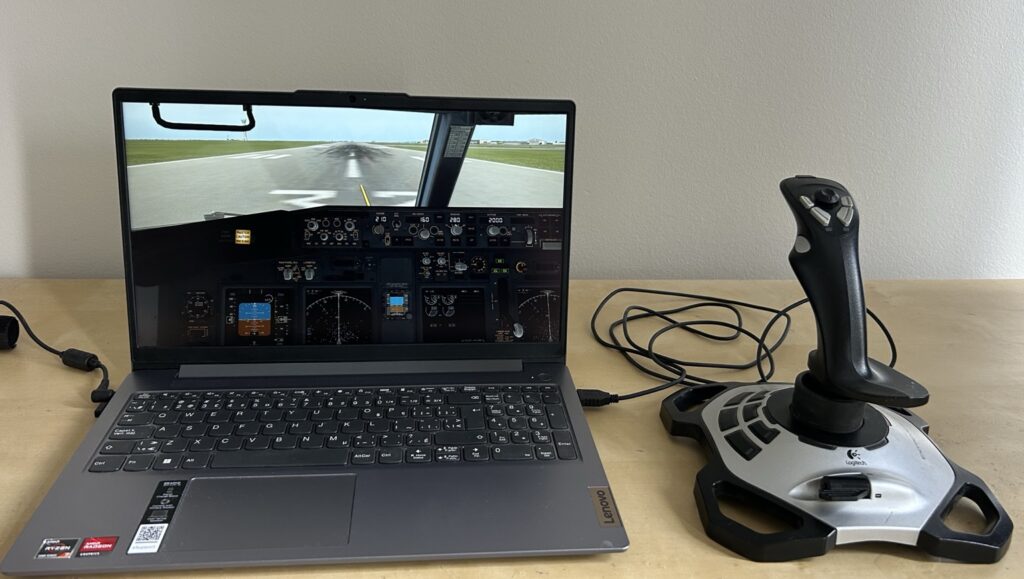
Hey there — I’m MElamin. Thanks for stopping by.
Flight Sim Essentials started from a simple passion: aviation and flight simulation. Unlike many high-end simulator setups you often see online, my journey began with limited hardware, older laptops, and learning through trial and error.
I’ve always been fascinated by aviation. Over the years, that interest slowly turned into hands-on experience through PC-based flight simulation, where I could explore aircraft systems, navigation, and virtual flying from my own setup at home.
What makes my journey a little different is that I didn’t start with powerful gaming hardware. I worked with what I had — testing different simulators, adjusting settings, and learning how performance changes depending on the system being used.
That process taught me something important: flight simulation is not just about realism or graphics — it’s about finding the right balance between performance, settings, and enjoyment on your own PC..
Flight Sim Essentials now focuses on helping beginners and everyday users get the most from flight simulators through real-world testing, hardware comparisons, performance benchmarks, and practical advice for low- to mid-range PCs.
Why I Built Flight Sim Essentials
This website is built for beginners and everyday users who want to enjoy flight simulation without needing expensive hardware or professional cockpit setups.
Here you’ll find:
- Beginner-friendly flight simulation guides
- Budget and mid-range PC setup tips
- Joystick and hardware recommendations
- Performance and optimization advice
- Real-world simulator testing experience
My goal is simple:
👉 To make flight simulation easier, more realistic in practice, and more enjoyable for regular users.
A Practical Approach to Flight Simulation
Everything I share here is based on real experience using different simulators on different systems. Over the years, I have tested flight simulation on an older HP laptop with integrated graphics, a Lenovo Ryzen 7 laptop with integrated Radeon graphics, and more recently a mid-range MSI gaming laptop with dedicated NVIDIA RTX graphics. These experiences helped me understand the differences between minimum requirements, real-world performance, and the compromises many users face when choosing hardware for flight simulation.
I focus on what actually works in real conditions, especially for users who want smooth performance without needing high-end hardware.
Let’s Keep Flying
Thanks again for visiting — it truly means a lot.
Whether you’re just starting out or improving your setup step by step, you’re welcome here.
Let’s keep learning and flying together.
Sincerely,

MElamin founder of flightsimessentials.com
I enjoyed reading your story because it’s refreshing to see someone emphasize that you don’t need the most expensive equipment to enjoy a hobby. So much content online focuses on high-end setups that it can make beginners feel like they have to spend thousands of dollars before they can even get started. Your experience of learning on older hardware shows that knowledge and persistence can often matter more than having the latest technology.
I also like your goal of making flight simulation approachable for everyday users. That’s the kind of perspective that helps build trust because readers know your recommendations come from real experience rather than just reviewing top-of-the-line products.
Hi Scott,
Thank you for your thoughtful comment. I’m glad you enjoyed reading my story. When I first started, I also believed that an expensive gaming PC was necessary, but after spending time testing different simulators on older and newer hardware, I realized that enjoyable flight simulation is still possible with realistic expectations and the right settings.
One of my goals is to help beginners avoid the same misconceptions I had and show that learning and persistence are just as important as having the latest technology. I’m happy that this message came across.
Thanks again for taking the time to share your thoughts!
Hi! I enjoyed reading your About Me page. It’s always nice to learn the story behind a website because it gives readers a better sense of the person sharing the information. Your enthusiasm for flight simulation really comes through, and I think that personal touch helps build trust with your audience. I’m curious, what first inspired you to get into flight simulation, and is there one aircraft or simulator you always find yourself coming back to? Thanks for sharing your journey!
Hi Bryce,
Thanks for your feedback, and I’m glad you enjoyed reading my story.
I’ve been interested in aircraft since I was young. I used to play with toy airplanes and was always curious about how aircraft operate. Over the years, I played different aviation games before discovering Microsoft Flight Simulator 2002, which sparked my interest in flight simulation.
Later, I tried installing Microsoft Flight Simulator 2020 on my old laptop, but it didn’t meet the minimum requirements, so the installation wasn’t successful. I then tried FSX, but I didn’t use it for long because it felt outdated. After that, I discovered X-Plane 11. It ran on my old laptop, although not very well, and when I upgraded to my new laptop, the experience improved significantly, especially after balancing the graphics settings.
Thanks again for your thoughtful comment and for taking the time to read my About Me page!
Hey there, fellow writer! I like the message behind your website. Too many people think they need a powerful gaming PC before they can even get started, but your experience proves that learning and enjoyment come first. I think budget-friendly advice is something the flight simulation community needs more of. I’m looking forward to seeing more of your optimization guides.
Hi John,
Thank you for your kind words and encouragement. I’m glad you liked the message behind my website.
My experience has taught me that you don’t always need expensive hardware to enjoy flight simulation. On my old HP laptop, I could only use Flight Simulator X. Microsoft Flight Simulator 2020 wouldn’t load because the laptop didn’t meet the minimum requirements, and although X-Plane 11 did run, the frame rate was too low for a comfortable experience.
After upgrading to my Lenovo laptop, X-Plane 11 ran much better, especially with balanced graphics settings. That’s why I enjoy sharing practical tips to help beginners get the best experience from the hardware they already have before spending money on expensive upgrades.
Thanks again for taking the time to leave such a thoughtful comment!
Your experience of learning through trial and error on older laptops feels very relatable. It is easy to keep changing graphics settings without knowing whether a small improvement is actually worth losing visual quality somewhere else. I imagine beginners can also become too focused on frame rates and forget whether the simulator still feels enjoyable to use. When you test a flight simulator on a low-end or mid-range PC, what tells you that you have found the right balance? Do you have a minimum frame rate you personally consider comfortable, or do smooth controls and consistent performance matter more than reaching a particular number?
Hi,
Thank you for your thoughtful comment. You’ve raised a great question. In my experience, smooth controls and consistent performance are more important than chasing the highest FPS.
To find the right balance, I reduced World Objects from Maximum to High, set Visual Effects to a balanced level, Anti-Aliasing to 2x, and Reflections to Low. That allowed me to keep good scenery without sacrificing too much performance.
For me, around 20–24 FPS is still playable, while 25 FPS and above feels more comfortable. Around large cities and airports such as New York or Toronto, the frame rate usually drops to around 15–20 FPS. At smaller airports or over rural areas, it is generally above 20 FPS, even with AI aircraft enabled. Changing the weather also causes a slight drop in frame rate.
These settings have worked well on my Ryzen 7 non-gaming laptop. When I eventually upgrade to a gaming laptop, I plan to test X-Plane 12 and Microsoft Flight Simulator 2020 or 2024. I expect balanced settings to provide significantly higher and more consistent frame rates, but I’ll share the actual results once I’ve tested them.
Thanks again for your great question!