
Last updated on September 23rd, 2026 at 11:25 pm
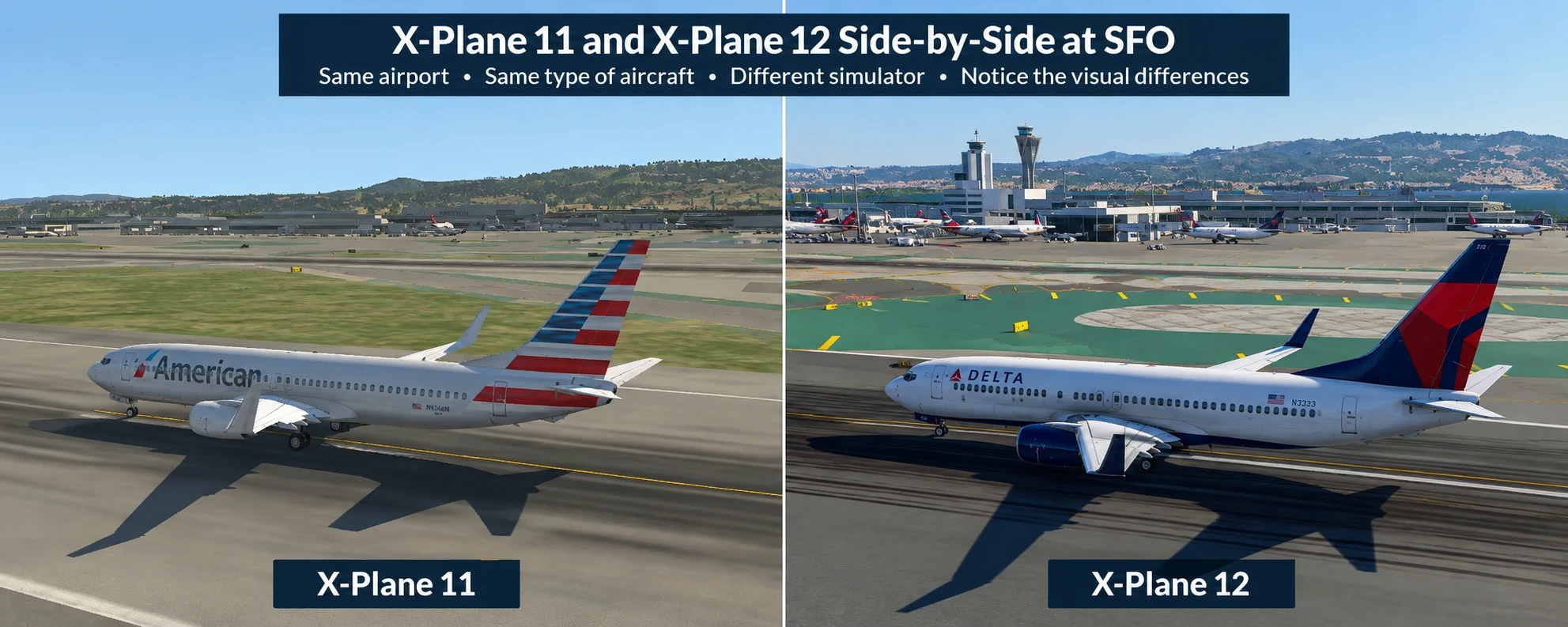
Trying out X-Plane 11 and X-Plane 12 on the same RTX 5060 gaming laptop seemed like a cool way to see how each simulator performs in a busy airport scenario. Now, this wasn’t about declaring a winner for all setups everywhere—just wanted to share what I found in a real-world test situation.
Using San Francisco International Airport (SFO) as the testing ground, I went with the Boeing 737-800 for both simulators. It provided a consistent platform to see how each program handled a heavy-duty flying environment.
What I found pretty interesting was how the newer X-Plane 12 managed to hit higher frame rates while still giving a visually better look, all in this specific setting. Surprised? Yeah, me too. I kinda expected the older simulator to be a little more forgiving on the hardware, or, at the very least, about the same. I had already seen strong results while testing X-Plane 12 on this gaming laptop, but this SFO comparison gave me a chance to see how it stacked up directly against X-Plane 11.
Now, this isn’t some universal claim. What we’re looking at here is how things played out with my RTX 5060 laptop—not what happens on other setups. If you’re flying somewhere else or using a different configuration, results could flip the other way entirely.
So, if you’re thinking about which simulator might suit your rig better,it’s important to consider factors such as the airport, aircraft, graphics settings, weather, and other conditions when comparing simulator performance. My findings? They’re just one piece of the big aviation puzzle.
My Test Setup: Similar Conditions, One Important Anti-Aliasing Difference
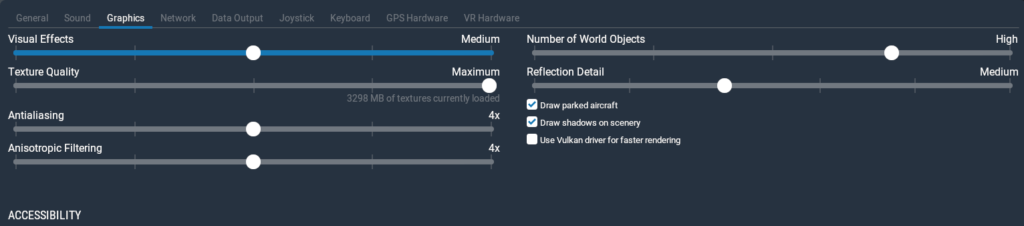
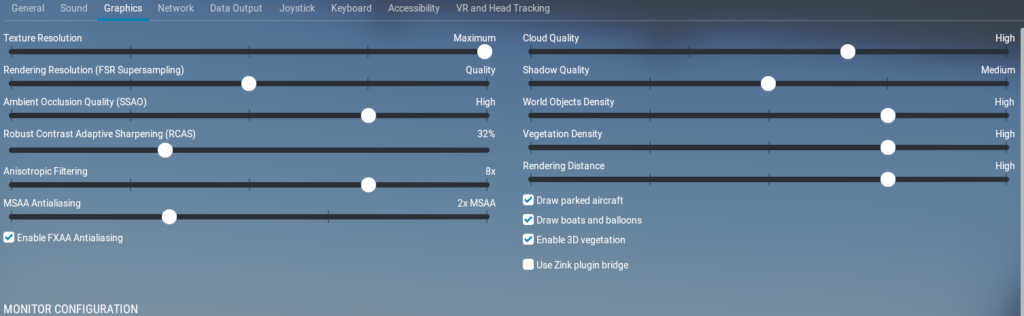
For a fair test between X-Plane 11 and X-Plane 12, I aimed to keep the conditions as close as possible. Operating both simulators under the same environment was the plan. Clear skies, high settings for World Objects, and maxed out Texture Quality were the name of the game. Plus, I included two AI aircraft to add a little realism to the scene.
San Francisco International Airport and the trusty Boeing 737-800 were the chosen constants. I figured sticking to the same airport and plane would give consistent results while I compared the software’s take on the virtual skies.
Here’s the catch: the anti-aliasing settings. This was the hiccup where things weren’t identical. X-Plane 11 was running with 4x anti-aliasing, while X-Plane 12 had 2x MSAA with FXAA turned on. While I tried to mirror settings as much as I could, the different anti-aliasing affects how each simulator looks and performs.
Why does this matter for the test? Well, anti-aliasing smooths out those pesky jagged lines, sure, but it also impacts frame rates and visual polish. In other words, it’s not just a setting; it’s a dynamic part of how the game plays out graphically.
Given all this, think of my test as practical insights rather than an academic experiment. For more controlled comparisons, I also use a consistent flight simulator benchmarking method that focuses on keeping as many variables as possible the same. Changes in those anti-aliasing settings mean it’s not a perfect apple-to-apple comparison, but hey, it’s still worth a peek to see how these sims stacked up under “usual flight” conditions.
X-Plane 11 at SFO: Takeoff Performance, Stutters, and Older-Looking Scenery
Flying out of SFO in X-Plane 11 had its ups and downs. During takeoff, the FPS tended to hover in the 20s. Not a complete deal-breaker, but the action felt a bit sluggish. That is also why I separate playable FPS from genuinely comfortable flying when I test flight simulators. After we left the ground, the frames picked up, usually landing in the 30s and sometimes sneaking into the 40s. It wasn’t bad at all once you were airborne.
Stuttering popped up here and there, especially noticeable during those more intense sequences. For a smooth ride, these hiccups can put a bit of a damper on that immersion you’re searching for. It’s like your brain is cruising along, but your setup is whispering, ‘Not so fast!’
Now, speaking of the airport, visually, it had this older, more auto-generated vibe compared to its counterpart. San Francisco International didn’t quite burst with detail or life; it was just there, doing its job without any flair.
The scenery around SFO in X-Plane 11 didn’t quite have that pop either. Everything felt a touch less vibrant and more generic. Looking out from the cockpit, you’d see the cityscape, sure, but not with the same level of richness or depth I later noticed in X-Plane 12. In terms of visuals, I could say it felt like stepping back in time a little.
So if detail is your goal, you might find it a bit lacking here. Even though X-Plane 11 looked older in this test, it was still usable once I was airborne and the frame rate improved. Just expect it to be a little rough around the edges in this particular setup.
X-Plane 12 at SFO: Higher FPS and a Richer Visual Experience in My Test
Trying out X-Plane 12 at SFO turned out to be a refreshing experience. During takeoff, I was pleasantly surprised to see the FPS generally hanging out in the 50s. It felt like everything was running smoother, even when our engines roared to life.
Once we took to the skies, the performance kept climbing, hitting FPS in the 60s. It was a noticeable jump up in terms of smoothness, which made the whole flying session feel much more fluid and connected.
Stuttering? Barely noticed it this time around, which was a relief. The whole experience was more immersive without those jarring interruptions. It was easy to lose myself in the flight, just the way it should be.
And the visuals? Hands down, X-Plane 12 was way more detailed. At San Francisco International Airport looked noticeably more detailed and realistic than it did in X-Plane 11. It felt like being in the heart of bustling aviation activity, where the surroundings actually had things happening—something I wasn’t fully expecting compared to X-Plane 11.
That extended to the surrounding scenery too. I mean, not only is there the city you’d expect, but little things like boats in the water caught my eye. Those tiny details added layers to the whole picture. It’s like X-Plane 12 really wanted you to feel you were part of a living world.
Honestly, when I went into this, I thought X-Plane 12 might put more pressure on my RTX 5060. But seeing it outperform X-Plane 11 in both FPS and visuals totally flipped my expectations. This particular test made me reconsider some assumptions about what ‘newer’ really means when it comes to simulation performance.
What This RTX 5060 Laptop Comparison Really Shows + FAQ
When you stack up my findings, In my SFO test, X-Plane 12 produced substantially higher FPS while also giving me more detailed scenery. Now, that doesn’t mean it wins in every scenario or on every rig, but for this For this particular San Francisco test on my RTX 5060 laptop, X-Plane 12 performed better in both the FPS results I recorded and the visual detail I observed.
It’s important to stress that the two tests were not completely identical. I kept the airport, aircraft, weather, World Objects, Texture Quality, and AI traffic similar, but the anti-aliasing settings differed. X-Plane 11 used 4x anti-aliasing, while X-Plane 12 used 2x MSAA with FXAA enabled. Because of that, I consider this a practical real-world comparison rather than a perfectly controlled benchmark.. So what we have here is a snapshot, not the whole photo album.
Why does this matter to you? Well, these practical insights give you an idea of what to expect from each simulator with similar day-to-day settings. It reminds us that real-world tryouts can surprise you and even change your expectations.
Frequently Asked Questions
Was this a perfectly apples-to-apples comparison?
Not completely. I kept the airport, Boeing 737-800, clear skies, High World Objects, Maximum Texture Quality, and two AI aircraft similar between both simulators. However, the anti-aliasing settings were different. X-Plane 11 used 4x anti-aliasing, while X-Plane 12 used 2x MSAA with FXAA enabled. Because of that, I consider this a practical real-world comparison rather than a perfectly controlled benchmark.
Which simulator had higher FPS in my SFO test?
X-Plane 12 had the higher frame rates in this particular test. During takeoff, X-Plane 11 was generally in the 20s, while X-Plane 12 was generally in the 50s. After takeoff, X-Plane 11 moved into the 30s and occasionally the 40s, while X-Plane 12 reached the 60s.
Did X-Plane 12 also look better?
In my test, yes. San Francisco International Airport looked more detailed and realistic in X-Plane 12, and I also noticed additional scenery details such as boats in the water. X-Plane 11 looked older and more generic by comparison.
Which simulator had more stuttering?
I noticed occasional stuttering in X-Plane 11, particularly during more demanding parts of the flight. In X-Plane 12, I noticed very little stuttering during this test.
Does this mean X-Plane 12 will always outperform X-Plane 11?
No. These results apply to my RTX 5060 laptop, San Francisco International Airport, the Boeing 737-800, and the settings I used. Different hardware, airports, aircraft, weather, add-ons, or graphics settings could produce different results.
Why was I surprised by the result?
I expected the older X-Plane 11 to be at least as easy to run, if not slightly lighter on the hardware. Instead, X-Plane 12 produced noticeably higher FPS in this test while also giving me more detailed scenery.
Why is the anti-aliasing difference important?
Anti-aliasing can affect both visual quality and performance. Since X-Plane 11 used 4x anti-aliasing and X-Plane 12 used 2x MSAA with FXAA, that difference could have influenced the results. That is why I do not treat the test as perfectly controlled.
Is the comparison still useful even though the settings were not identical?
I think so. The test still shows how both simulators behaved on the same laptop, at the same airport, with the same aircraft and similar core settings. Being transparent about the anti-aliasing difference allows readers to understand the limitation rather than assuming every variable was identical.
What I Learned From This SFO Comparison
This test gave me a result I did not expect. On my RTX 5060 laptop at San Francisco International Airport, X-Plane 12 produced higher FPS, showed more detailed scenery, and had less noticeable stuttering than X-Plane 11.
At the same time, I would not use this single test to claim that X-Plane 12 will always perform better. The anti-aliasing settings were different, and simulator performance can change depending on the airport, aircraft, weather, scenery, and other settings.
The biggest takeaway for me is that newer software is not automatically slower on newer hardware. Real-world testing can sometimes give a very different result from what you expect based simply on the age of the simulator.
For my particular SFO test, X-Plane 12 gave me the better combination of FPS, smoothness, and scenery detail, but the result should be understood within the specific conditions I tested. It is another example of why balancing visual quality and FPS can matter more than simply choosing the highest possible graphics setting.
This comparison provides a useful real-world perspective on X-Plane 11 and X-Plane 12 using the same RTX 5060 laptop and SFO environment. I appreciate the transparency about the different anti-aliasing settings, as that is an important limitation when interpreting the FPS results. The discussion shows how airport density, aircraft choice, and graphics settings can significantly influence simulator performance. Most importantly, the emphasis on testing under realistic conditions gives readers a more practical understanding than relying solely on system requirements or assumptions.
Hi Kavitha,
Thanks for your thoughtful comment. Using the same RTX 5060 laptop helped me see that performance can vary a lot depending on the airport and simulator.
One result that surprised me was X-Plane 11 at SFO. I expected the FPS to be higher on my new laptop, but it stayed in the 20s while sitting on the runway. At JFK, though, X-Plane 11 stayed in the 40s. What surprised me even more was that X-Plane 12 stayed in the 50s at SFO, even though it is the more demanding simulator.
The lower FPS in X-Plane 11 at SFO was caused by having AI aircraft and parked aircraft enabled, which added more load to the scene.
That experience reminded me that performance can change a lot depending on what is active in the simulator, not just the hardware or simulator version.
Hello MElamin,
I’ll admit I’m a total beginner when it comes to flight simulators, so a lot of the technical side of comparing X-Plane 11 and 12 is new to me. What I found interesting was that the newer version actually performed better on your RTX 5060 laptop while also giving you the better visuals. I would have assumed better graphics would automatically mean sacrificing some performance.
For me, whether I upgrade software or a game really depends on how much I’m going to use it. If it’s something I’m really interested in and know I’ll spend a lot of time with, I’m much more willing to upgrade for better performance and features. If I only use it occasionally, I’m usually happy sticking with what already works.
I also appreciated that you mentioned the difference in anti-aliasing settings instead of presenting the FPS numbers as a perfectly equal comparison. For someone completely new to flight simulators, would you recommend starting directly with X-Plane 12, or is there still a reason a beginner might want to start with X-Plane 11?
Angela M 🙂
Hi Angela,
Thanks for sharing your perspective. I had a similar expectation before testing because I assumed the newer simulator would automatically be harder to run, especially with better visuals.
For a complete beginner, I think X-Plane 11 can still be a good place to start if the PC is older or more limited because it is lighter and easier to run with balanced settings. If someone already has a capable gaming laptop or PC, though, I would be more comfortable recommending X-Plane 12 because it offers newer visuals and features while still performing well on suitable hardware.
In my case, I stayed with X-Plane 11 for a long time because it worked better on my older laptop. After upgrading to an RTX 5060 laptop, X-Plane 12 became much more practical for me and performed better than I originally expected.
So I think the better starting point depends more on the hardware than on whether someone is new to flight simulation.