
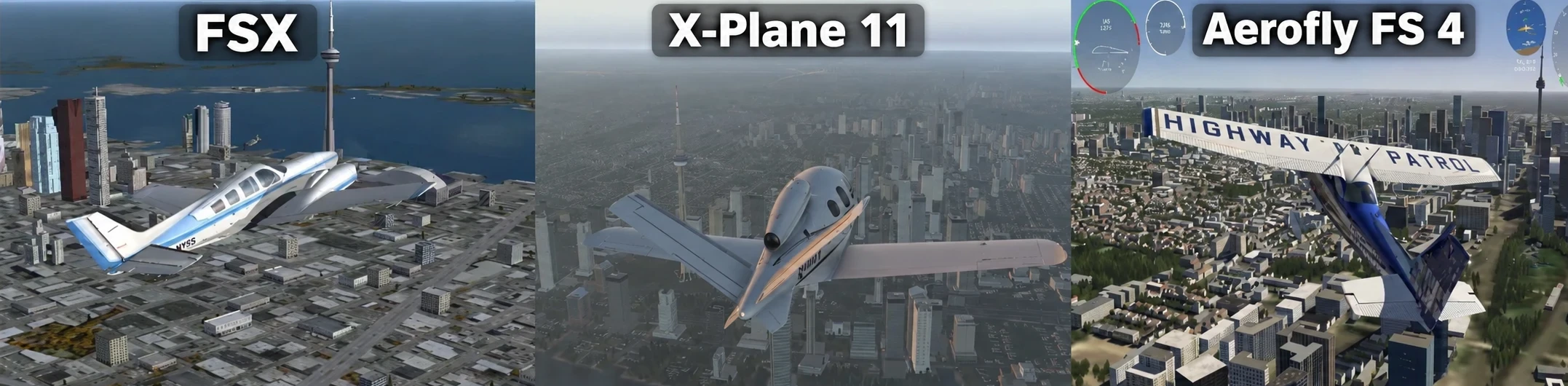
Using my own flights around Toronto, I compared Microsoft Flight Simulator X, X-Plane 11, and Aerofly FS 4 to see which one may be a good fit for lower-end computers. I’m not treating this as a strict benchmark with detailed FPS testing. Instead, I’m focusing on how each simulator runs, feels, and looks during normal flying.
For people using older or modest hardware, smoothness matters just as much as graphics. High settings can look impressive, but they are not very useful if the simulator stutters badly or becomes difficult to control.
For this comparison, I used three different aircraft: a Beechcraft Baron 58 in FSX, a Cirrus Vision in X-Plane 11, and a Cessna 172 in Aerofly FS 4. Since I used different aircraft, this is not an exact apples-to-apples benchmark. My goal was to compare the general experience of flying each simulator around Toronto.
There is no single best simulator for everyone. Some users may care more about realism, while others may prefer smoother performance or more colorful scenery. My experience with these three simulators showed that each one has a different balance of strengths and weaknesses.
If you’re just getting started, my beginner guide to flight simulation on a low-end or mid-range PC covers the basics of choosing a simulator and setting up your system.
What I Look For in a Flight Simulator for a Low-End PC
When I use a flight simulator on lower-end hardware, I pay attention to how smoothly it runs and whether the graphics settings need a lot of adjustment.
Scenery detail matters too. I look at how cities appear from the air, whether buildings look realistic or generic, and whether the scenery still looks good without pushing the hardware too hard.
I also consider how much tweaking is required. A simulator that runs smoothly with reasonable settings may be more useful on a low-end PC than one that looks better but constantly stutters.
There is no one-size-fits-all answer. Different users will value different things, so I look at smoothness, visual quality, scenery detail, and how comfortable the simulator feels during normal flying.
Microsoft Flight Simulator X: The Easiest-Running Option, With Clearly Dated Scenery
I decided to revisit Microsoft Flight Simulator X to see how it compared with newer flight simulators. I installed it on my newer laptop and started with very high graphics settings before reducing them to High and lowering some vehicle and airport traffic.
After reducing the settings, performance felt smoother. The number of buildings was reduced slightly, but the overall experience became more comfortable.
I used the Beechcraft Baron 58 and took off from Toronto City Centre Airport. After takeoff, I could see some road traffic, the CN Tower, and buildings around Toronto.
The biggest weakness was the scenery quality. FSX clearly looks dated compared with newer simulators. The airport looked older, and many of the houses and buildings appeared generic.
Still, FSX has an advantage for users who care more about easier performance than modern visuals. It is an older simulator, and the graphics reflect that, but it can still provide an enjoyable flying experience if you do not mind the dated scenery.
Here’s a short flight I recorded in FSX using the Beechcraft Baron 58 after taking off from Toronto City Centre Airport. The video shows the Toronto scenery, including the CN Tower, road traffic, and the more dated style of buildings I mentioned above.
X-Plane 11: A More Modern-Looking Balance of Detail and Smoothness
Flying X-Plane 11 felt like a noticeable visual step up from FSX. I used the Cirrus Vision over Toronto, and the buildings and houses looked more detailed and less generic.
X-Plane 11 does not look as modern as Microsoft Flight Simulator 2020 or 2024, but in my experience it still looks much better than FSX. Toronto appeared newer and more realistic from the air.
For someone who wants more detailed scenery and a more modern-looking simulator without moving straight to the newest and most demanding flight sims, X-Plane 11 can offer a good middle ground.
Settings may still need to be adjusted on lower-end hardware, especially if stuttering becomes noticeable. I tested the simulator with very high graphics settings. There was some stuttering, but the overall performance was not too bad during my flight. If X-Plane 11 feels inconsistent, my X-Plane 11 stuttering and FPS guide for budget laptops covers some of the settings and issues I experienced.
In this X-Plane 11 flight, I used the Cirrus Vision over Toronto. The video shows the more detailed buildings and newer-looking scenery compared with what I saw in FSX.
Aerofly FS 4: Colorful Toronto Scenery With Plenty of Buildings
I used the Cessna 172 in Aerofly FS 4 and flew around Toronto after taking off from Toronto City Centre Airport. I later returned and landed at the same airport.
I used Ultra graphics settings during this flight. There was some stuttering, especially because of the large number of buildings being displayed.
One thing that stood out to me was the scenery. I noticed more buildings than I did in X-Plane 11, and in my opinion Toronto looked more colorful and visually attractive.
The city view felt lively and modern, although the Ultra settings were clearly demanding enough to introduce some stuttering.
For lower-end PCs, I would not assume Ultra is the best choice. Reducing some settings may provide a better balance if smoother performance is more important than maximum visual quality.
Aerofly FS 4 gave me a different experience from both FSX and X-Plane 11. FSX was easier to run but looked dated, while X-Plane 11 offered more realistic-looking scenery. Aerofly FS 4 stood out to me for its colorful city view and the large number of visible buildings around Toronto.
This Aerofly FS 4 video shows my Cessna 172 flight around Toronto, starting and ending at Toronto City Centre Airport. It also shows the colorful city scenery and the large number of buildings I noticed during the flight.
FSX vs. X-Plane 11 vs. Aerofly FS 4: Which Experience Fits Your Low-End PC Priorities?
FSX was the easiest-running option in my comparison, but its scenery and buildings looked the most dated.
X-Plane 11 gave me a better balance between realism and performance, while Aerofly FS 4 stood out for its colorful Toronto scenery and large number of buildings. Both could stutter at very high or Ultra settings.
The best choice depends on what matters most to you: easier performance, more realistic scenery, or a more colorful visual experience.
Frequently Asked Questions
Which flight simulator is easiest to run on a low-end PC?
From my experience, FSX was the easiest-running option after I reduced some settings. The trade-off is that the scenery and buildings look much more dated than in X-Plane 11 or Aerofly FS 4.
Which simulator looked the most modern to me?
X-Plane 11 looked much more modern than FSX, with more detailed and less generic buildings. Aerofly FS 4 also looked modern and, in my opinion, had the most colorful city scenery around Toronto.
Did X-Plane 11 stutter on high settings?
Yes. I noticed some stuttering when using very high graphics settings, although the overall experience was still not too bad during my Toronto flight.
Did Aerofly FS 4 stutter on Ultra settings?
Yes. I noticed some stuttering on Ultra, especially with the large number of buildings being displayed around Toronto.
Is FSX still worth using on a low-end PC?
It can be, especially if easier performance matters more than modern visuals. The main downside is that the scenery, airports, houses, and buildings look noticeably dated.
Which simulator is best if I care more about scenery?
That depends on what you prefer. X-Plane 11 looked more realistic to me than FSX, while Aerofly FS 4 stood out for its colorful city scenery and large number of buildings.
Do I need to use the highest graphics settings?
No. My experience showed that higher settings can introduce stuttering. Reducing some settings may give a better balance between visual quality and smoothness.
What I Learned From Flying All Three
My experience with FSX, X-Plane 11, and Aerofly FS 4 showed that there is no single best lightweight flight simulator for every low-end PC.
FSX was the easiest to run in my comparison, but its visuals clearly showed their age. X-Plane 11 offered a much more modern and realistic-looking environment, although very high settings introduced some stuttering. Aerofly FS 4 stood out to me for its colorful Toronto scenery and large number of buildings, but Ultra settings could also cause stuttering.
For me, the best choice depends on what matters most: easier performance, more realistic scenery, or more colorful visuals. The most useful approach is to choose a simulator that matches the hardware you already have and then adjust the settings until the experience feels smooth enough to enjoy. My flight simulator system requirements vs real-world performance article goes into more detail about why a simulator that technically runs may not always run comfortably.