
Last updated on February 22nd, 2026 at 09:53 am
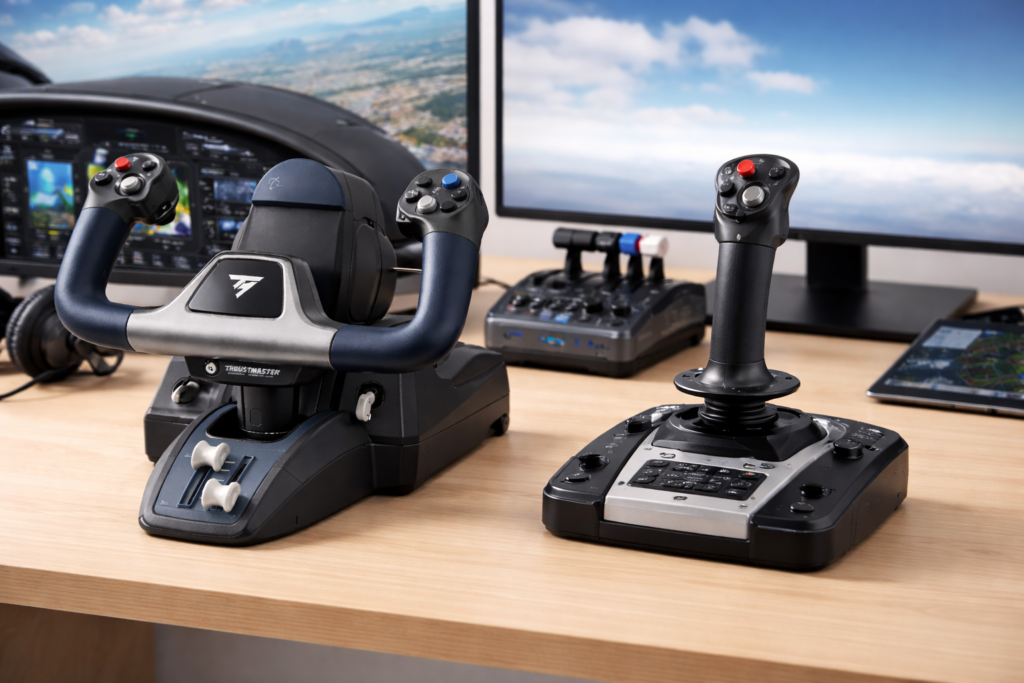
Choosing between a yoke and a joystick can feel confusing at first because both offer different strengths. In this guide, I break down how each control behaves, which aircraft they’re suited for, and what type of flying style they complement. This helps you choose the control setup that feels right for your goals and your simulator. If you’re just beginning your flight sim journey, be sure to check out my step-by-step guide to getting started with flight simulation.
Understanding Yokes Vs. Joysticks
The debate over yokes versus joysticks has long been a topic among flight simulation enthusiasts and real-world pilots alike. Both devices provide ways to control and maneuver an aircraft, but each does so with a different feel and operational style. In the following sections, I break down the differences and similarities based on real-world usage, control mechanics, and even cost. This way, you get a well-rounded view before making a choice.
Many flight sim enthusiasts report that a yoke feels more immersive for general aviation, while a joystick offers quicker response for fast-paced flying—an opinion commonly echoed in community discussions such as those on AVSIM.
Yokes typically offer a classic two-hand control experience. They mimic the design you might find in many general aviation aircraft, featuring a push-pull setup for pitch and rotational movements for roll. Joysticks, on the other hand, have a more compact design tailored for quick, responsive control inputs. Understanding these nuances is key to aligning your simulation hardware with the way you prefer to fly.
Real-World Aircraft Use

In real-world flying, the type of control system you’ll find depends a lot on the aircraft. Yokes show up in aircraft like the Cessna 172 or larger Boeing jets—so if you’re into simulating commercial or general aviation flights, they’ll feel right at home. Joysticks, on the other hand, are more common in fighter jets, helicopters, and even some modern airliners like those from Airbus. The compact design makes them ideal for high-speed or aerobatic flying—just like in real life.
The joystick’s compact design is especially handy in combat and aerobatic situations where quick reflexes and rapid adjustments are necessary. This real-world application helps inform its use in simulations, where staying true to aircraft operation is a key objective. This design is part of Airbus’s fly-by-wire system, which replaces traditional mechanical linkages with electronic controls for improved safety and performance.
Control Feel and Mechanics
How each control feels in your hands plays a major role in how natural the simulator experience becomes. A yoke uses the classic push-pull motion for pitch and a turning motion for roll, offering a smooth, steady control style that mirrors how many training and passenger aircraft handle in real life. This design supports gradual, stable inputs—great for long flights, approaches, and training-style flying.
A joystick, however, is designed for quick, precise, one-handed control. Many pilots describe joysticks as more sensitive and immediate, which is an advantage for helicopter flying, military jets, or any aircraft that demands agile maneuvering. The compact movement range also makes joysticks easier to use in smaller setups.
Choosing the right control system depends on whether you prefer smooth, deliberate inputs or fast, responsive handling.
Quick Glance: Joystick vs. Yoke – Which One’s Right for You?
| Feature / Metric | Joystick | Yoke |
| Typical Use / Aircraft Type | Fighter jets, aerobatics, helicopters, modern & military sims | General aviation, airliners, classic GA aircraft |
| Control Style & Feel | Single-hand grip, more “twitchy,” high responsiveness, short throw | Two-hand grip (or one hand + trim controls), smoother motion, larger throw |
| Range of Motion / Precision | Smaller physical movement but very fine angular control | Larger movement range (especially in pitch), feels more gradual |
| Desk / Mounting Space | Compact, easy to mount on a desk or clamp | Requires larger mounting surface; often needs extra depth |
| Button / Control Integration | Usually many programmable buttons and hat switches on the grip | Fewer built‑in buttons on the yoke — additional switches often in throttles or panels |
| Learning Curve | Faster to pick up for fast maneuvers, but may take time to master subtle control | More intuitive for “airplane-style” flying; gradual control can help for long flights |
| Cost (Entry Level) | Generally more affordable for comparable quality | Higher entry cost once you account for bundling of throttles, trim wheels, etc. |
| Upgrade / Expansion Possibility | Common path to full HOTAS setups (throttle, pedals, etc.) | Expand via throttles, trim, multi-axis add-ons, full cockpit development |
| Best For | Simulators emphasizing agility, combat, aerobatics | Simulators focusing on general aviation, airliners, cross‑country / training style |
| Realism / Immersion | Excellent for certain aircraft types (jets, fighters) | More realistic for GA and classic cockpit layouts |
Precision and Range of Motion
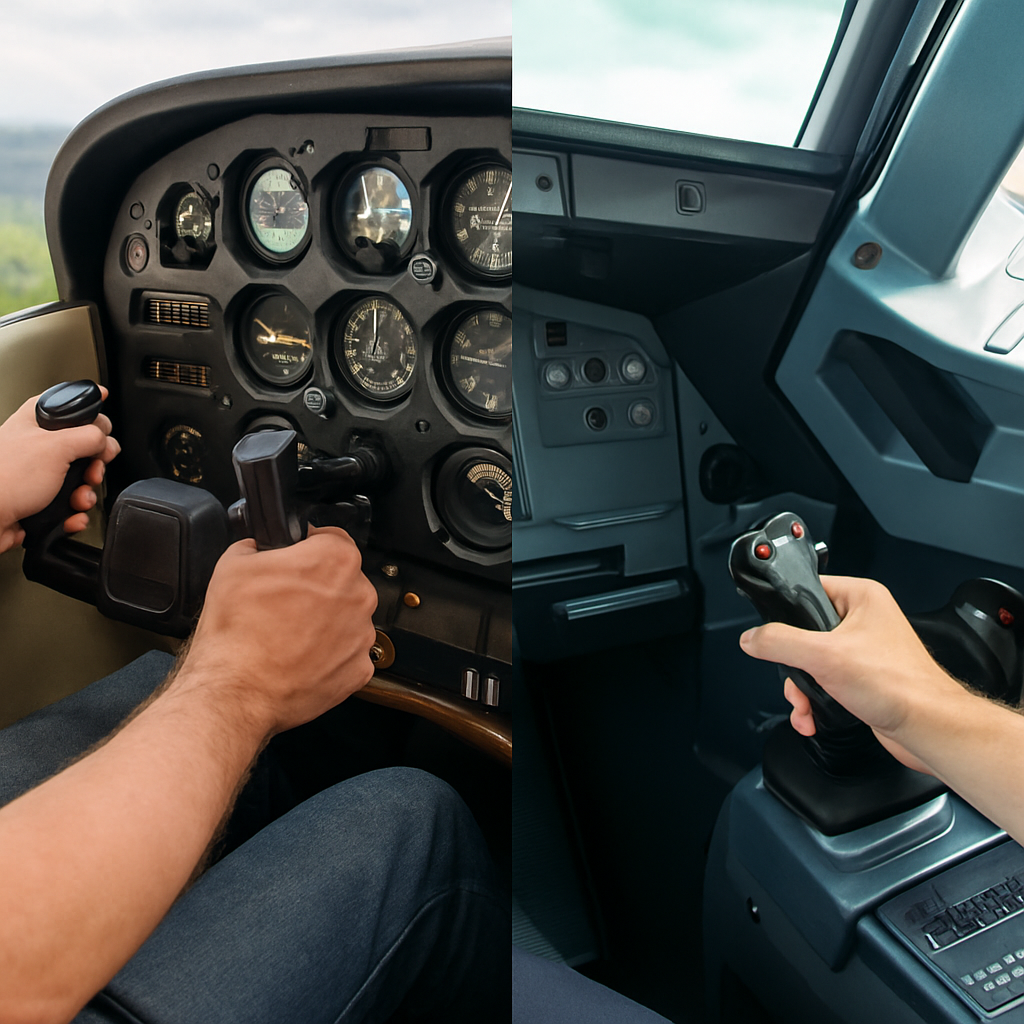
One of the biggest differences between these control types is how they translate movement into precision. Joysticks typically offer very fine, accurate control with minimal physical motion, making them excellent for aerobatics, combat flying, or any scenario that requires fast, precise adjustments. If you’re leaning toward a joystick setup, here’s my breakdown of the best joysticks for a realistic flight experience.
Yokes, in contrast, provide a wider physical range of movement—especially in pitch. This broader control arc more closely matches the feel of general aviation and commercial aircraft, giving many sim pilots a more realistic sense of stability and trim control.
Your preferred aircraft and flying style will determine whether precision through small movements or realism through larger motions matters more to you.
Space and Setup Considerations
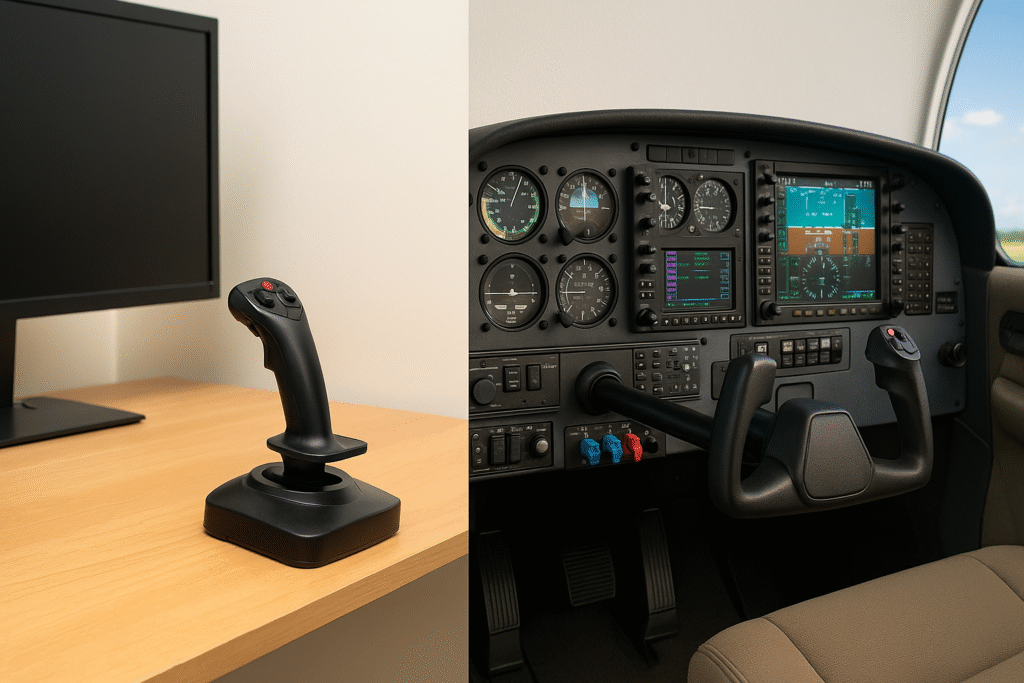
Your available desk space or simulation setup environment is another important factor to consider. Joysticks are usually more compact and easier to mount. They often fit neatly on most desks, making them an excellent option if you’re working with limited space. Their streamlined design makes for a clutter-free setup that many users appreciate when keeping things simple.
Yokes, however, typically require more room. They need a larger mounting area and sometimes even a designated cockpit layout to deliver the ideal simulation environment. For those with dedicated flight sim rooms or larger desks, this isn’t an issue. But if you’re a casual user, the extra space needed could influence your decision. Ultimately, choosing a control system comes down to balancing the available space with your simulation goals.
Thinking about a more permanent setup? Check out our guide to building a DIY home cockpit on a budget for layout ideas and gear recommendations.
Compatibility with Flight Simulators
Both yokes and joysticks work well with major flight simulation platforms such as Microsoft Flight Simulator, X-Plane, and Prepar3D. Most hardware is recognized immediately, although certain aircraft add-ons are sometimes designed with one control type in mind.
If you’re still deciding which simulator to start with, my guide to the Top 5 Beginner-Friendly Flight Simulators offers a simple breakdown of each platform mentioned here.
For example, add-ons that simulate traditional general aviation aircraft or airliners often feel more authentic when paired with a yoke. Conversely, military jets, helicopters, and aerobatic aircraft tend to match the quick responsiveness of a joystick.
Choosing the right controller ultimately depends on the aircraft you fly most often and how closely you want your setup to mirror real-world operation. A well-matched control system not only improves realism but also makes your overall setup smoother and more enjoyable.
Button Layout and Functionality

Another practical aspect to consider is the button layout and any extra controls available on the device. Joysticks frequently come with several programmable buttons and hat switches located directly on the grip. This setup allows for quick access to functions like camera controls, weapon systems, or flight mode changes without removing your hand from the control.
Because of this design, joysticks tend to centralize most controls in one hand, while yokes distribute tasks across multiple components in the cockpit.
In contrast, yokes often offer fewer built-in buttons on the yoke itself. However, many yoke packages come paired with throttle quadrants and separate trim wheels, creating a more complete cockpit-style layout. Depending on how you plan to use your simulator—whether that means casual flying or detailed training scenarios—your preference for integrated buttons versus dedicated external controls can help guide your choice. For even greater realism, you can also add rudder pedals to expand the setup.
Flight Experience: Which One Suits Your Style?
When I first started flight simulation, I flew using a Logitech joystick with a laptop running Flight Simulator X. Compared to flying with only a keyboard, the joystick immediately made a noticeable difference—basic maneuvers felt smoother, landings were easier to control, and maintaining alignment during approach required far fewer corrections. That early setup showed me how much the right control hardware can change the overall flying experience, even in a simple simulator environment.
The ultimate choice between a yoke and a joystick depends on the kind of flying experience you are chasing. If your simulation interests lean toward airliners or general aviation aircraft, a yoke provides a more immersive, hands-on feel. The dual-handed operation alongside the realistic range of movement closely replicates traditional cockpit controls, making extended flights and training sessions feel notably authentic.
If your passion lies more with military simulations, stunt flying, or even futuristic space combat, a joystick might better suit your needs. Its rapid response rate and compact design are perfect for executing agile maneuvers that some pilots find essential in high-adrenaline scenarios. The immediate control input can be particularly helpful during those split-second adjustments demanded by such simulations.
If you’re aiming for a more authentic experience when flying general aviation aircraft or airliners, a yoke setup can really make a difference. One popular and highly-rated option is the Honeycomb Alpha Flight Controls Yoke, which offers smooth control inputs and a realistic feel for flight sim enthusiasts.
Price, Value, and Upgrade Options
The cost is always a very important consideration, especially for newcomers to flight simulation. Entry-level joysticks, such as popular models from Logitech, tend to be less expensive. They make a great starting point if you’re not yet ready to commit to a more elaborate control system. Price-wise, a joystick can deliver solid value while still offering the fundamental features you need.
Yoke setups, however, might require a larger initial outlay. Products like the Honeycomb Alpha often come bundled with throttles or trim wheels to provide a full cockpit experience. Although this increases the upfront cost, many simulation enthusiasts feel that the added realism and natural control experience justify the extra investment.
It’s also essential to think about your future upgrade path. Many users start with a basic joystick setup and later transition to a full HOTAS (Hands On Throttle and Stick) system when they desire more functionality. Similarly, yoke users frequently expand their systems with additional multi-axis throttles, trim wheels, or even complete cockpit rebuilds. Assessing your long-term simulation goals can help you decide which system will offer the best overall value for both your current setup and future upgrades. An example is the Thrustmaster HOTAS Warthog, a replica of the U.S. Air Force A-10C’s controls, offering precise input and a realistic feel.
Top-Rated Flight Simulator Yokes Compared
| Feature / Model | Honeycomb Alpha Flight Controls Yoke | Logitech G Saitek PRO Flight Yoke System | Thrustmaster TCA Yoke Pack Boeing Edition | Turtle Beach VelocityOne Flight |
| Rotation Range | 180° full rotation with steel shaft | Realistic yoke motion | Boeing-style pendular movement | 180° rotation with integrated rudder |
| Throttle Included | ❌ (sold separately) | ✅ Includes throttle quadrant | ✅ Includes swappable throttle levers | ✅ Modular throttle quadrant |
| Build Quality | Solid steel shaft, ball bearings | Sturdy plastic and metal components | Official Boeing-licensed, premium materials | All-in-one build with trim wheel and LCD |
| Control Features | 5-position ignition + switch panel | 3 modes with 75 programmable inputs | Boeing-style controls with flap detents | Trim wheel, real-time display, LED status panel |
| Compatibility | PC (MSFS, X-Plane, etc.) | PC (MSFS, X-Plane, P3D) | PC and Xbox Series X | PC, Xbox Series X and S |
| Best For | Serious simmers wanting realism | Budget-conscious pilots | Boeing fans, airliner simmers | Beginner to advanced users seeking all-in-one system |
Best Flight Simulator Yokes You Can Buy on Amazon (Top-Rated Picks)
**Please note: This post contains affiliate links. As an Amazon Associate, I earn from qualifying purchases at no extra cost to you.

If you’ve decided that a yoke is the right choice for your flight simulator setup, picking the right one can make a huge difference in how real the experience feels. Whether you’re flying general aviation aircraft or large commercial jets, these top-rated yokes offer smooth control, quality construction, and features that match various flying styles and budgets. Below are some of the most popular and well-reviewed options available on Amazon right now.
Images used in this guide are illustrative. For exact product photos, specifications, and current pricing, please refer to the Amazon product pages.
1. Honeycomb Alpha Flight Controls Yoke

Designed by pilots and aerospace engineers, this yoke offers a realistic full 180° rotation with a solid steel shaft and dual linear ball bearings for smooth control. It includes a switch panel with master, alternator, avionics, and light switches, as well as a 5-position ignition switch.
Check current price and availability on Amazon
2. Logitech G Saitek PRO Flight Yoke System
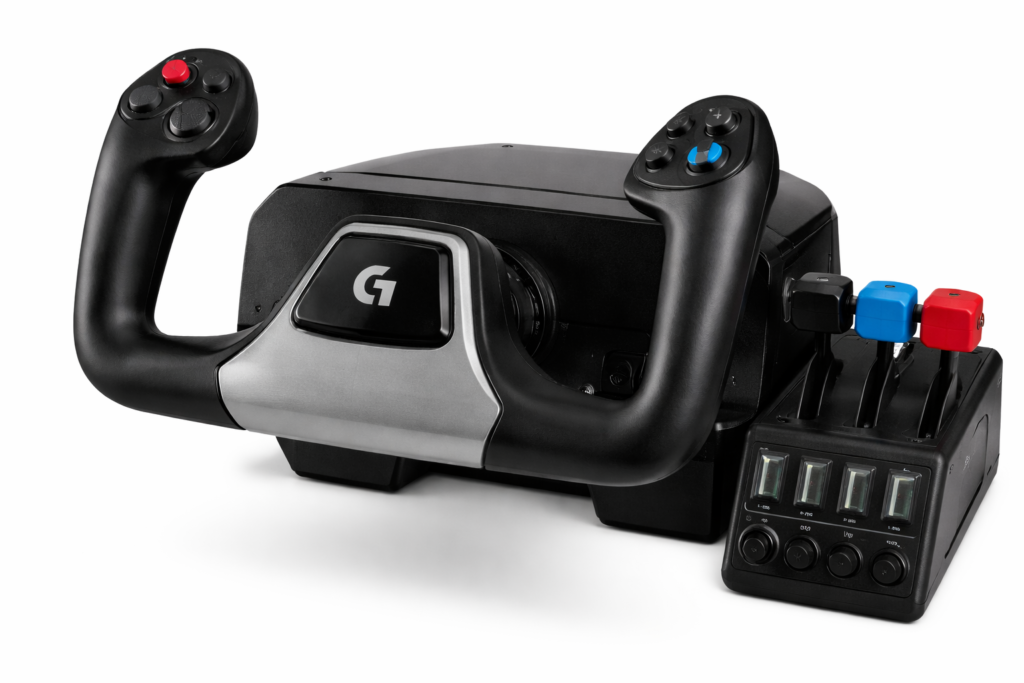
A professional simulation yoke and throttle quadrant featuring 3 modes and 75 programmable controls. It provides realistic and precise control, enhancing muscle memory for aspiring pilots.
Check current price and availability on Amazon
3. Thrustmaster TCA Yoke Pack Boeing Edition
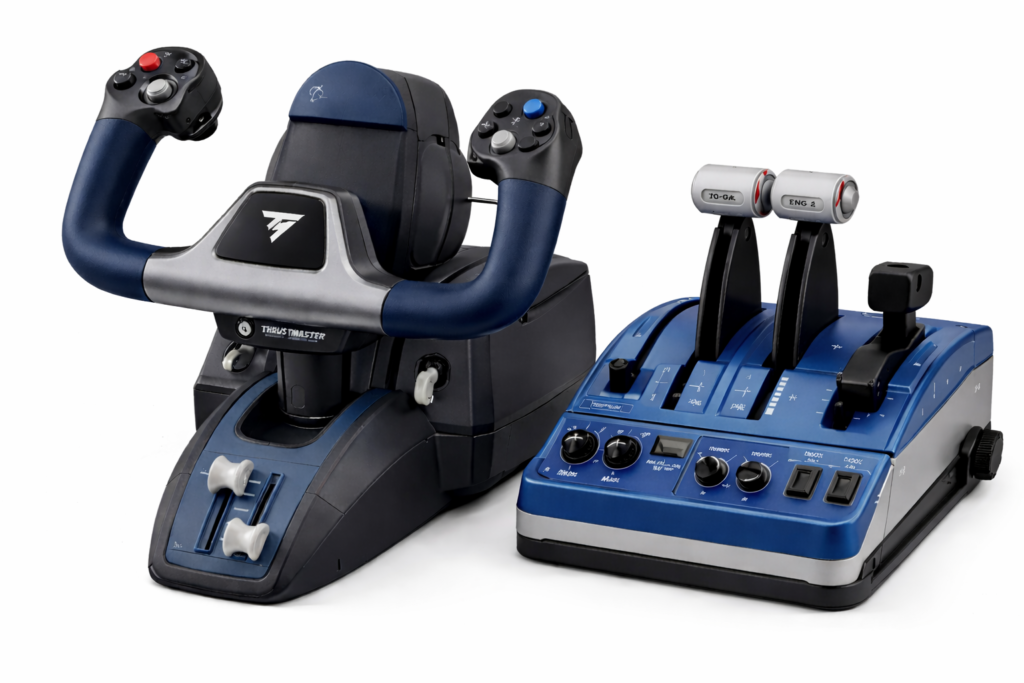
Officially licensed by Boeing, this yoke pack replicates the flight kinematics of the Boeing 787. It features a pendular mechanism for realistic control and includes a throttle quadrant with swappable levers.
Check current price and availability on Amazon
4. Turtle Beach VelocityOne Flight Universal Control System
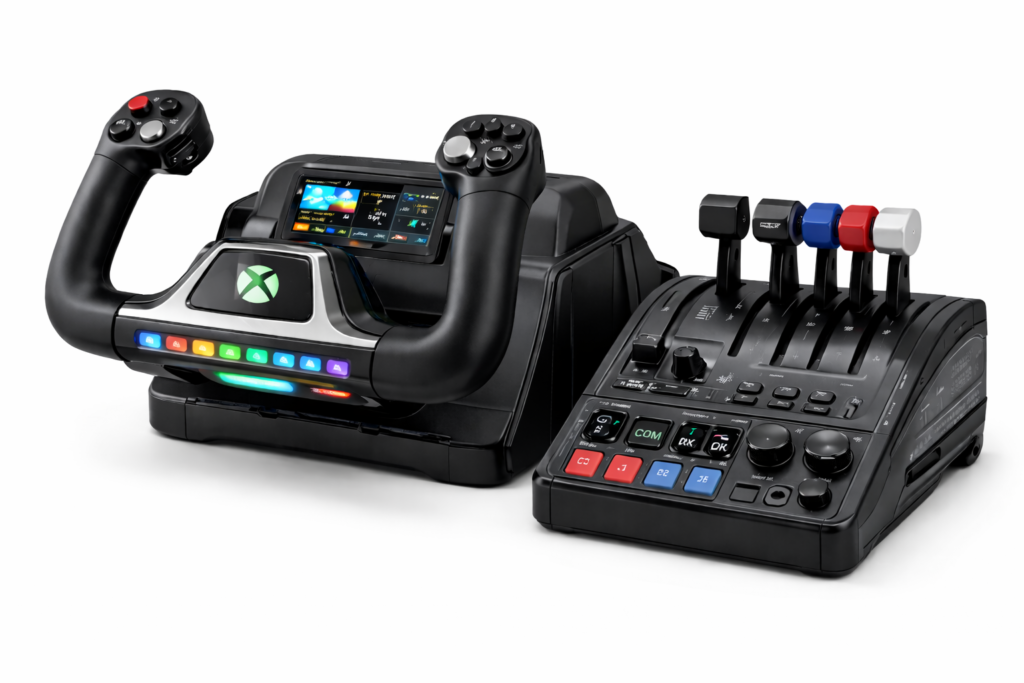
This all-in-one flight control system includes a yoke with true-to-life 180° rotation, integrated rudder controls, and a modular throttle quadrant. It’s designed for both beginner and advanced sim pilots, featuring a customizable status panel, trim wheel, and a display for real-time feedback. Compatible with Xbox Series X|S and Windows PCs, it offers a complete solution for immersive home cockpit setups.
Check current price and availability on Amazon
With so many yoke options on the market, it can be tricky to know which one will best match your flight sim setup and flying style. To help you compare the most popular choices side by side, here’s a quick breakdown of four top-rated yokes—each offering its own strengths when it comes to realism, control precision, and simulator compatibility.
Extra Tips for Flight Simulation Enthusiasts
Subtle upgrades can enhance your experience once you’re comfortable with your main controls. Many simmers add soft LED backlighting behind the monitor to reduce eye strain during night flights and create a more immersive atmosphere.
Calibrating your controls is one of the most impactful improvements you can make. Fine-tuning joystick or yoke sensitivity and mapping buttons to match your flying style can immediately smooth out your handling in the simulator.
You can also benefit from setup ideas shared in flight sim communities. Enthusiasts often post clever tweaks, mods, and troubleshooting tips that can improve accuracy or comfort. As you refine your setup, pay attention to ergonomics as well—proper device height and positioning make a noticeable difference during long flights.
Mixing different types of practice flights, from slow approaches to quick maneuvers, helps you better understand how your controls respond in various situations. Every simmer finds their ideal configuration through experimentation, so take your time and adjust as needed. The more you tune your setup, the more natural and enjoyable each flight becomes.
Quick Buying Recommendation
If you mainly fly general aviation aircraft or airliners and want the most realistic cockpit feel, a yoke is usually the better buy.
If you fly military jets, helicopters, aerobatics, or have limited desk space, a joystick offers better value, faster response, and easier setup.
For many beginners, starting with a joystick is the most affordable and flexible option — with the ability to upgrade later.
Frequently Asked Questions
Question: How do I decide between a yoke and a joystick if I’m new to flight simulation?
Answer: Consider which type of aircraft you prefer and the maneuvers you expect to perform. If you enjoy simulating airliners or general aviation aircraft, a yoke might deliver the immersive experience you’re after. If combat or aerobatic simulations excite you more, a joystick could be a better match.
Question: Will a joystick provide enough control for serious flight simulation?
Answer: Yes, a joystick can offer very precise control and rapid response, which is particularly appealing in scenarios that require quick input. However, it might not fully replicate the dual-handed experience offered by a yoke.
Question: Are there compatibility issues between these controllers and popular simulation platforms?
Answer: Both yokes and joysticks work well with major simulation platforms like Microsoft Flight Simulator, X-Plane, and Prepar3D. Some aircraft add-ons may be optimized for one type of setup over the other, so checking user reviews and recommendations can really help guide your decision.
Question: What if I decide to upgrade my simulation setup later on?
Answer: Many flight simulation enthusiasts begin with a basic joystick or yoke system and gradually expand. Joystick setups can evolve into full HOTAS systems, while yoke configurations can be pumped up with specialized throttles and trim wheels. Both choices allow for significant growth in your simulation rig over time.
Question: Do I need rudder pedals if I buy a joystick or yoke?
Answer: Not right away. Most joysticks include twist-rudder control, and many yokes can be paired with button-based rudder inputs. But dedicated rudder pedals provide far smoother taxiing, coordinated turns, and crosswind landings. They’re one of the best upgrades once you get comfortable with your main controls.
Final Thoughts
At the end of the day, picking between a yoke and a joystick really comes down to the kind of experience you want. If you’re aiming for that classic cockpit feel—like flying a Cessna or a Boeing—a yoke gives you a more hands-on, immersive vibe. But if you’re into quick, high-adrenaline flying like in combat or aerobatics, a joystick might feel more in tune with your needs. Think about your desk space, your goals, and where you want to take your setup in the future. There’s no one-size-fits-all—just what feels right for you.
Remember that your available workspace and future upgrade plans play a big role in this decision. A compact joystick fits neatly in tight spaces and can serve as a stepping stone into more advanced setups, whereas a yoke represents an investment in a truly authentic flying experience. Your simulation setup isn’t just about the current hardware; it’s also about where you see your simulation hobby growing down the line. Both choices offer unique benefits, and the decision ultimately hinges on what feels right for you. Happy flying and may your simulations always feel just a bit more real!
Ready to Take Your Simulation Further?
Whether you’re just getting started or fine-tuning your dream setup, there’s always something new to explore in the world of flight simulation. Dive deeper into your passion by checking out related guides like How To Set Up Your First Custom Flight Simulator or Essential Hardware Upgrades For Enhanced Sim Experiences.
Your next level of realism might be just one tweak—or one new piece of gear—away. ✈️
I don’t have any hands-on experience with flight simulation, but I’ve always found it fascinating to watch — especially the setups and controls shown on TV! This post really helped me understand the difference between yokes and joysticks, which I never quite realised before. Loved how you explained everything so clearly. Definitely gave me a new appreciation for the realism that sim enthusiasts aim for. Great read!
Hi Sharon,
I’m really glad the explanation helped make the differences clearer. Flight sim controls can look complicated from the outside, so it’s great to hear the breakdown made things easier to understand. Thanks for reading!
This is a fantastic and well-explained comparison! I really appreciate how you highlighted the different control styles and real-world applications of yokes and joysticks. It’s especially helpful for beginners to understand that there’s no one-size-fits-all solution—what matters most is matching the hardware to your personal flying goals and preferences. The mention of real-world aircraft setups, like the Cessna with a yoke and Airbus with a sidestick, adds great context. Your step-by-step guide sounds like a great next step for those just starting out. Thanks for putting together such a thoughtful and practical resource!
Hi!
Happy to hear the comparison was helpful. You’re right—choosing between a yoke and joystick really does come down to the type of flying you want to do. Getting that match early on makes the overall experience much smoother. Appreciate the kind words!
This was such a helpful breakdown really appreciated how you didn’t just compare features but connected them to actual flying styles. I’ve been torn between going all-in on a yoke for realism or sticking with my trusty joystick for its space-saving convenience. Your insights on upgrade paths were especially eye-opening. Do you think switching between both setups depending on the aircraft makes sense, or is that overkill for a home sim pilot?
Hi Kavitha,
Switching between a yoke and a joystick makes sense if you regularly fly different aircraft types—like GA planes and airliners. But if you mostly stick to one category, a single setup is usually enough. It really depends on the mix of immersion, space, and budget you’re aiming for.
I have never tried a yolk, only a joystick when playing games, but must admit I haven’t tried flight simulators, only what is available in games.
I would have thought a yolk would be better for practicing to control a plane, and I see that my thinking was right, as you say the joystick is only used in jets and helicopters.
So as I understand it, a joystick would be used more to simulate acrobatic flying and intricate maneuvers, while the yolk would be used to practice conventional flying as it is more stable and easier to handle?
Hi Michel,
You’ve got it right. Yokes are great for stable, traditional flying in general aviation and airliners, while joysticks offer quicker control for jets, helicopters, and aerobatic flying. Each has its strengths depending on the aircraft and style you want to simulate.
Hello MEIamin!
I really enjoyed this comparison of yokes vs joysticks — it was clear, balanced, and helpful even for someone who’s not deeply into flight sims. As someone curious about trying simulation flying, your explanations of how each feels, handles, and what setups they suit gave me a much better idea of what to aim for.
I liked that you didn’t push one as “best for everyone” — it feels more honest to admit it depends on style and preference. I’m leaning toward starting with a joystick for space and flexibility, but part of me wants to try a yoke just to see that classic feel. If you were doing it all over now, which would you pick as your first controller? And are there any hybrid setups or add-ons you’ve used that combine the best of both worlds?
Thanks for helping bridge the gap between “wanting to fly” and “knowing how to choose gear.”
Angela M 🙂
Hi Angela,
Really glad the comparison helped! If I were starting today, I’d still begin with a joystick—it’s flexible, space-friendly, and easy to learn on. Later on, trying a yoke adds that classic GA feel. Some modular setups even let you switch between both, which is great if you enjoy flying a mix of aircraft. Happy to share recommendations if you need them!