
Last updated on April 11th, 2026 at 08:13 pm

Flight simulators let you experience the thrill of flying without ever stepping into a real cockpit — but how realistic that experience feels depends heavily on the joystick you use. A well-designed joystick improves control precision, makes landings smoother, and helps maintain stable flight during approaches. In this guide, I’ve selected the best flight simulator joysticks under $300 that offer a strong balance of realism, reliability, and value — so you can choose one with confidence and start flying with better control right away.
When you’re in the market for a joystick, a few essentials are worth focusing on. Precision matters because it directly affects how stable your aircraft feels during approach and landing. A responsive joystick allows smoother pitch control, better rudder coordination, and fewer overcorrections — especially in light aircraft and airliners. If you’ve ever struggled to keep the aircraft steady on final, the joystick is often the missing piece.
Customizability is another huge plus. The more you can tailor your setup to match how you like to fly — whether it’s adjusting sensitivity curves or assigning controls to buttons — the more natural everything feels in the sim. Get your flight controls feeling just how you like them — it’s like having your own cockpit configuration, minus the massive expense!
Price versus quality can be a tricky balance. With a range of options covering everything from basic models to high-end setups, it’s important to consider the right joystick that matches your flying style and simulator setup. Do your homework to ensure that what you’re choosing has the features you need without blowing the budget. Remember, the right tool can make all the difference between a frustrating experience and an exhilarating one.
So, where to start? Consider how invested you are in flight sims and what you’re looking to get out of them. Whether you’re just getting started in flight sims or you’re a seasoned pilot looking to elevate your experience, there’s a joystick out there that’ll give you the wings you need.
If you want smoother approaches, better control during landing, and less frustration in the cockpit, choosing the right joystick is one of the most noticeable upgrades you can make.
🕹️ Let’s Dive Into the Top Joysticks for Every Type of Virtual Pilot
**Please note: This post contains affiliate links. As an Amazon Associate, I earn from qualifying purchases at no extra cost to you.
After comparing real user feedback, long-term reliability reports, and hands-on experiences shared across flight sim communities, I selected the joysticks below based on control accuracy, durability, and overall value for the price. These picks work well with popular simulators like MSFS, X-Plane, and FSX, and each one fits a different flying style and budget.
If you’re upgrading from keyboard controls or an entry-level stick, the joysticks below are reliable options that noticeably improve handling and immersion. Each pick balances performance, durability, and price, making it easier to choose a model that fits your flying style and budget.
Images used in this guide are illustrative. For exact product photos, specifications, and current pricing, please refer to the Amazon product pages.
1. 💸 Thrustmaster T.Flight HOTAS X: Budget-Friendly and Beginner-Approved

Overall Rating:
Best For: Beginners and casual simmers on a budget
Key Highlights: Detachable throttle, Z-axis twist rudder, plug-and-play setup, solid for MSFS and Elite Dangerous
Joystick Rating Breakdown:
The Thrustmaster T.Flight HOTAS X is a standout for anyone looking to get started without emptying their pockets. Easy on the budget, this joystick delivers decent build quality and includes a twist rudder (Z-axis), which is fantastic for intuitive control. Plus, it’s got a detachable throttle for that added flexibility. It works well with titles like MSFS 2020 and Elite Dangerous.
However, you might find the buttons a bit limited, and the throttle can feel a tad light and noisy during heavy action scenes. Still, many simmers see this as the ideal first HOTAS, and for the price, it’s hard to argue. With smart key bindings and creativity, it’s a practical way to experience flight sim immersion on a budget.
For new sim pilots looking for a simple upgrade without committing to expensive hardware, this model offers a practical entry point into HOTAS flying.
Check availability and current price on Amazon
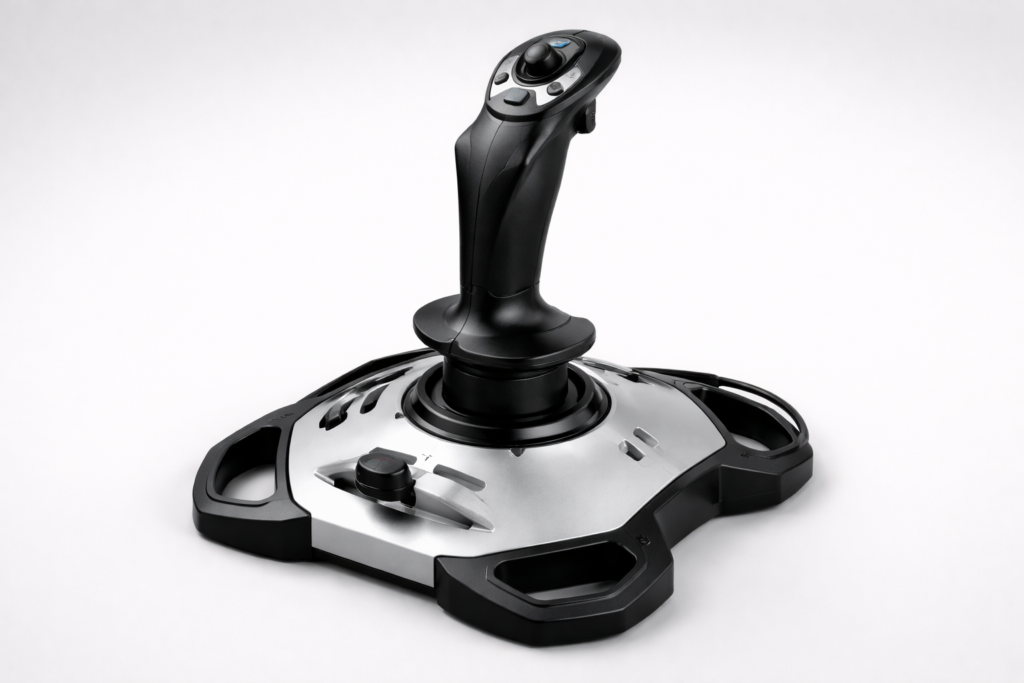
2. Logitech G Extreme 3D Pro: A Reliable Beginner Stick I’ve Personally Used
Overall Rating:
Best For: Beginners and budget-conscious simmers
Key Highlights: 12 programmable buttons, twist rudder, compact design, plug-and-play setup
Joystick Rating Breakdown:
The Logitech G Extreme 3D Pro has been around for years, and after using it myself, I can see exactly why it’s still recommended for beginners. It’s simple, affordable, and works straight out of the box without any complicated setup.
🎮 My Experience Using It
When I first switched from keyboard controls to this joystick in Flight Simulator X and later in X-Plane 11, the difference was immediate. Basic maneuvers felt smoother, and landings became much more manageable compared to using just a keyboard.
However, after using it for a while, I started noticing its limitations — especially during more precise flying.
During final approach, particularly when flying the Boeing 737 at lower speeds, small inputs on the joystick can feel a bit sensitive. This sometimes leads to slight overcorrections when trying to maintain a steady glide path. It’s not a dealbreaker, but it does take time to get used to.
I found that adjusting the sensitivity curve and adding a small dead zone in the simulator settings helped reduce this issue and made landings smoother overall.
⚖️ What It Does Well
- Very easy to set up — plug and play
- Reliable for general flying and beginner training
- Twist rudder works well for taxiing and coordinated turns
- Great value for the price
⚠️ Where It Falls Short
- Fine control during landing can feel a bit sensitive
- Limited precision compared to higher-end sticks
- Potentiometers may wear over time with heavy use
🎯 Who This Is For
If you’re just starting out or upgrading from keyboard flying, this joystick is more than enough to improve your control and overall experience.
But if you start noticing issues with fine control during landing or want smoother, more precise inputs, that’s usually the point where upgrading to something like the Thrustmaster T16000M or a HOTAS setup becomes worth considering.
🧠 Final Thought
From my experience, the Logitech Extreme 3D Pro is a solid starting point. It won’t give you perfect precision, but it will get you flying comfortably and help you build the fundamentals before moving to more advanced hardware.
Check availability and current price on Amazon
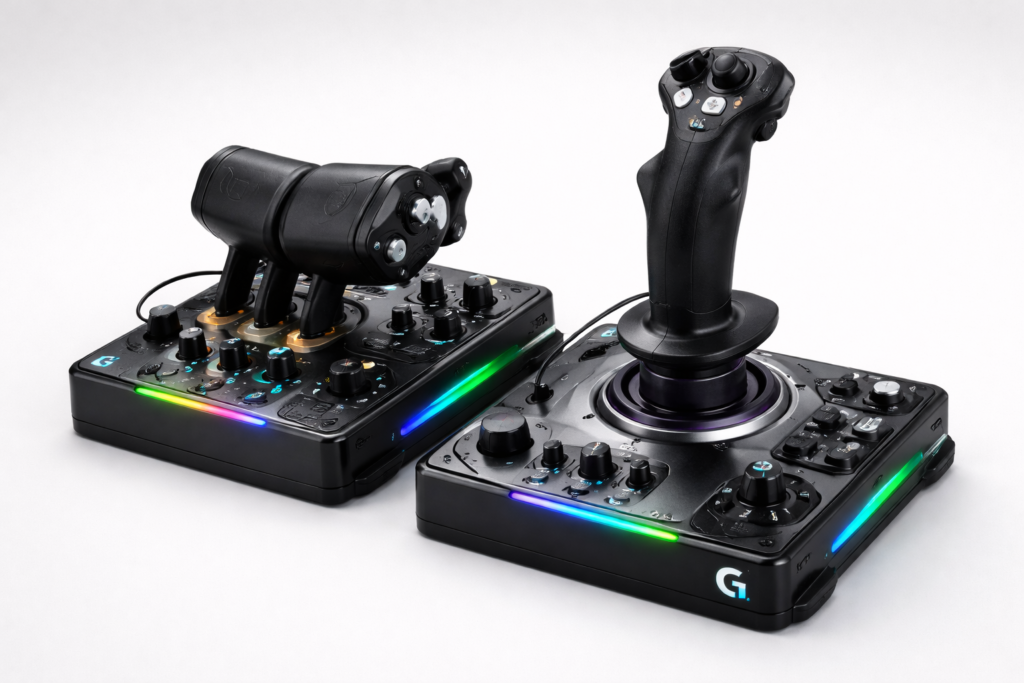
3. 🔷 Logitech G X56 HOTAS RGB: Mid-Range Power with Advanced Customization
Overall Rating:
Best For: Mid-range simmers who love customization
Key Highlights: Dual throttles, RGB lighting, mini analog sticks, over 180 mappable controls
Joystick Rating Breakdown:
For those willing to spend a bit more for expanded control and flexibility, the Logitech G X56 HOTAS RGB delivers a compelling package. Dual throttles, RGB lighting, and tons of programmable buttons make it a strong contender for those flying multi-engine aircraft or diving into space sims.
It’s popular in games like Star Citizen and Elite Dangerous, and the dual mini-sticks are great for fine adjustments. But buyer beware — many users report issues like yaw jitter, throttle drift, and software instability. The plastic build and quality control problems don’t match the price tag for some.
Still, with setting up your first custom simulator and occasional tweaks (or mods), it’s a powerful mid-tier option that bridges the gap between entry-level and enthusiast gear.
Check availability and current price on Amazon
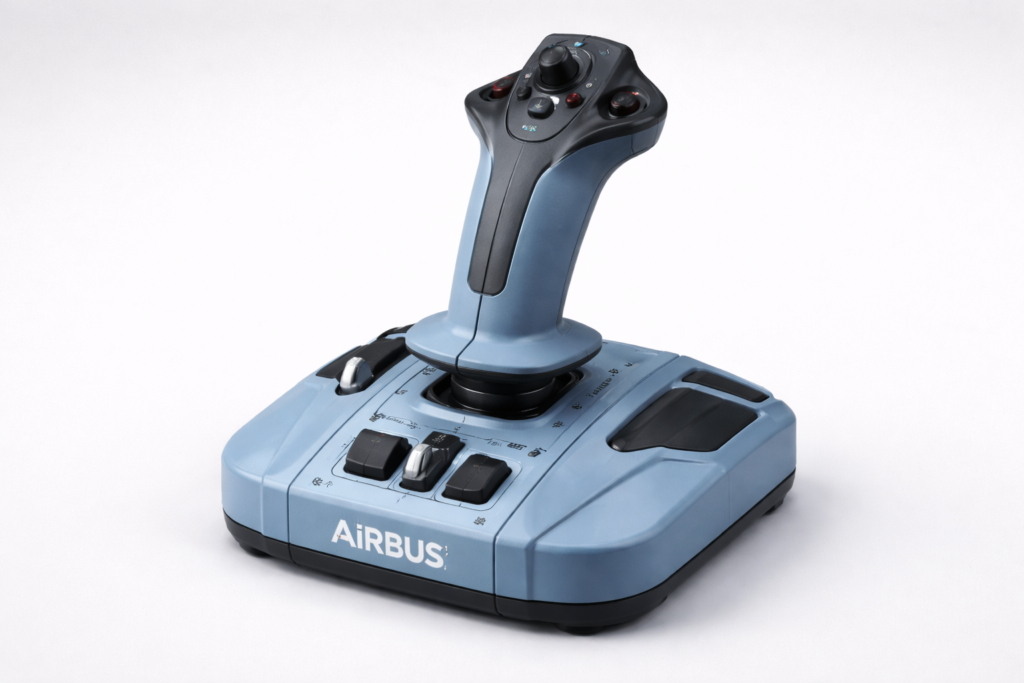
4. ✈️ Thrustmaster TCA Sidestick Airbus Edition: For the Aspiring Airliner Captain
Overall Rating:
Best For: Airbus fans and MSFS users
Key Highlights: Airbus-style design, ambidextrous stick, modular add-ons, great for airliners
Joystick Rating Breakdown:
Designed as a replica of the Airbus A320 sidestick, this model is ideal for airliner sim fans — especially in Microsoft Flight Simulator. Its compact form and plug-and-play simplicity make it attractive for newcomers and space-conscious simmers.
It’s ambidextrous, modular, and pairs well with Thrustmaster’s add-on throttle quadrant. However, the twist rudder’s potentiometer is known to degrade over time, and the throttle slider lacks tactile feedback. Button layout could be more distinct for in-flight usability.
For those focused on Airbus flying and casual sessions, though, it nails the essentials with style.
Check availability and current price on Amazon
5. 🔧 Thrustmaster T16000M FCS HOTAS: A Noticeable Upgrade in Precision

Overall Rating:
Best For: Intermediate simmers who want better control and precision
Key Highlights: Hall effect sensors, TWCS throttle, multiple hats/sliders, strong value for the price
Joystick Rating Breakdown:
The Thrustmaster T16000M FCS HOTAS is often recommended as the next step up from entry-level joysticks — and based on my experience with the Logitech Extreme 3D Pro, I can clearly see why.
🎮 How It Compares to My Current Joystick
Using the Logitech Extreme 3D Pro gave me a solid foundation, but one thing I consistently noticed — especially during landing — was how sensitive small inputs could be.
That’s where the T16000M stands out.
Thanks to its Hall effect sensors, control inputs are smoother and more consistent. Compared to a potentiometer-based stick like the Logitech, you get:
- More stable pitch and roll inputs
- Less overcorrection during final approach
- Better precision when trimming or making small adjustments
👉 In practical terms, this means:
- Smoother landings
- Easier control in turbulence
- More confidence when flying manually
⚖️ What Makes It Stand Out
- Hall effect sensors provide higher precision and durability
- TWCS throttle adds much better power control
- Plenty of buttons and hats for mapping complex controls
- Strong value for simmers moving beyond beginner level
⚠️ Real-World Downsides
- Twist rudder can develop jitter over time
- Throttle may feel sticky without minor adjustments
- Build quality is still mostly plastic
However, one advantage here is the active flight sim community — many users share simple fixes and tweaks that improve performance and extend lifespan.
🎯 Who Should Consider This Upgrade
If you’re currently using a basic joystick like the Logitech Extreme 3D Pro and you’ve started noticing:
- Difficulty maintaining a stable approach
- Overcorrection during landing
- Limited control precision
👉 This is usually the point where upgrading makes a real difference.
The T16000M isn’t just about more buttons — it’s about better control feel, which directly impacts how smooth your flying becomes.
🧠 Final Thought
From what I’ve experienced with entry-level hardware, the jump to something like the T16000M is less about features and more about control quality. If you want smoother inputs and more consistent handling — especially during landing — this is one of the most noticeable upgrades you can make without going into high-end territory.
Check availability and current price on Amazon
Frequently Asked Questions
Before wrapping up, let’s tackle a few common questions that pop up when choosing a flight sim joystick on a budget. Whether you’re new to the hobby or upgrading from a basic setup, these quick answers will help you make a confident and cost-effective decision.
Question: Can I get a high-quality joystick for under $300?
Answer: Yes — and in 2026, the under-$300 range is actually the sweet spot for most sim pilots. Models like the Logitech Extreme 3D Pro, Thrustmaster T.Flight HOTAS X, Thrustmaster T16000M FCS, and TCA Airbus Sidestick offer precise control, reliable build quality, and excellent long-term performance without entering premium territory.
Unless you need force feedback or a full metal gimbal system, you don’t need to cross the $300 line to get a highly realistic flying experience.
Question: Are budget joysticks durable enough for long-term use?
Answer: Surprisingly, yes. The Logitech Extreme 3D Pro is known to last 5–10+ years for many simmers — and mine is 6 years old and still works reliably with only minor wear on the twist rudder. Good maintenance (keeping it clean and avoiding aggressive twisting) goes a long way toward extending lifespan.
Higher-end budget sticks like the Thrustmaster T16000M FCS use Hall effect sensors, which provide smoother input and significantly better longevity than older potentiometer-based sticks. These sensors don’t wear down from friction, which helps maintain precision over time.
If long-term durability is important to you, avoid ultra-cheap no-name brands and stick to Logitech or Thrustmaster, both of which consistently deliver well-built sticks in the under-$300 range.
Question: Will these joysticks work with MSFS, X-Plane, FSX, and DCS?
Answer: Yes — all the joysticks in your guide support:
- Microsoft Flight Simulator 2024
- X-Plane 12
- FSX
- DCS World
- Elite Dangerous
- Star Citizen
BUT here’s the nuance:
- DCS pilots often prefer sticks like the T16000M or X56 because of the extra hats and sliders for HOTAS-style flying.
- Airliner pilots prefer the TCA Airbus Sidestick for its realistic Airbus feel.
- Beginner GA pilots often start with the Extreme 3D Pro or T.Flight HOTAS X.
Match the stick to the aircraft you fly most.
Question: What trade-offs should I expect under $300?
Answer: You’re unlikely to get:
- Metal gimbals
- Force feedback
- Premium-grade throttle quadrants
- Magnetic brake systems
- High-end hall-sensor yaw modules
But you will get:
- Great precision
- Smooth axis control
- Solid entry-level or mid-range durability
- Plenty of buttons for mapping avionics and autopilot functions
Under $300 is the “value sweet spot” where performance and cost intersect.
Question: Should beginners invest in rudder pedals or is twist rudder enough?
Answer: For most beginners — twist rudder is more than enough.
Models like the Extreme 3D Pro, TCA Airbus Sidestick, and T16000M all include twist yaw, which is perfect for:
- Taxiing
- Coordinated turns
- Crosswind landing practice
Upgrade to pedals only if you want:
- More realism
- Better precision during takeoff/landing
- A dedicated multi-engine or airliner setup
Pedals are amazing — but they’re optional, not required.
Question: Do more expensive joysticks actually make flying easier?
Answer: Yes, but not in the way beginners expect.
Higher-quality sticks give you:
- Smoother pitch/roll control
- Better response during final approach
- Less overcorrection when landing
- More stable trimming
- More consistent inputs for VFR flying
This means your flying gets cleaner, especially in:
- C172 pattern work
- ILS approaches
- Turbulence
- Helicopter flying
- Airliner hand-flown departures
If you struggled with keyboard flying or an old joystick, even a $60–$80 stick will feel like a night-and-day upgrade.
Question: Do I actually need throttle controls for flight simulation?
Answer: You can absolutely start without one.
A stick with a built-in mini throttle (like the Logitech Extreme 3D Pro) is fine for beginners.
But a separate throttle becomes valuable if you fly:
- Airliners
- Twin-engine turboprops
- Military jets
- GA planes requiring fine power control
Models like the T.Flight HOTAS X and T16000M FCS HOTAS give you much smoother power management, which helps during approach, flare, and stall prevention practice.
Question: How do I choose between a sidestick and a traditional joystick/HOTAS?
Answer: Choose based on your preferred aircraft:
- Airbus, modern jets:
→ TCA Airbus Sidestick (true-to-life feel) - General aviation (Cessna, Piper), helicopters, DCS jets:
→ T16000M FCS or Logitech Extreme 3D Pro - Space sims & multi-engine aircraft:
→ Logitech X56 HOTAS (tons of buttons and dual throttles) - Beginners on a budget:
→ Thrustmaster T.Flight HOTAS X
Your flying style determines your joystick, not the price tag.
✈️ Final Thoughts: Getting the Best Value for Your Budget
At the end of the day, you don’t need to drop a fortune to enjoy a smooth and immersive flight sim experience. The joysticks under $300 we’ve looked at strike a balance between affordability and performance — giving you enough precision and comfort to make every takeoff, landing, and maneuver feel more realistic.
If you’re just starting out, a budget-friendly stick like the Logitech Extreme 3D Pro or Thrustmaster T.Flight HOTAS X will more than cover the essentials. If you’re ready to stretch a bit closer to the $300 mark, mid-tier options like the Thrustmaster T16000M FCS HOTAS open the door to greater precision and expandability without blowing your budget.
The key is to choose what fits your flying style today while leaving room to upgrade later. With the right stick in hand, you’ll discover that flying on a budget doesn’t have to mean cutting corners on the experience.
👉 Ready to level up your sim gear?
Explore the joystick options we covered above to see which model fits your flying style and simulator best. Each listing includes a link to check availability and current pricing on Amazon, making it easy to compare options when you’re ready to upgrade.
And if you’re building a full setup, don’t miss our other hardware guides:
- How To Select The Right Rudder Pedals For Your Simulator
- Best Throttle Quadrants For Various Aircraft Models
- Building A DIY Home Cockpit On A Budget
Fly smart, fly immersive — and most importantly, have fun while you’re at it. ✈️
As someone who’s spent countless hours in flight simulators, I’ve learned that the right joystick can completely transform the experience, from feeling like a game to feeling like genuine training. Force feedback and ergonomic grip have made the biggest difference for me, especially during longer sessions. I’ve used both entry-level and higher-end models, and while price doesn’t always guarantee realism, precision and durability are non-negotiable. I’m curious how these recommendations perform over time with regular use, especially in terms of calibration drift or button wear. It’s great to see such a range of options depending on setup and skill level.
Hi Slavisa!
You’re absolutely right — the right joystick can completely change how realistic and enjoyable a sim feels. Force feedback and good ergonomics matter a lot during long sessions. Higher-end models tend to hold calibration better over time, but even mid-range sticks stay reliable with occasional calibration and light cleaning.
This is such a helpful guide! My youngest brother is really into flight simulators, and he’s been talking non-stop about upgrading his setup lately. I had no idea how much of a difference a good joystick could make in terms of realism until reading your breakdown here. You did a great job explaining the features and differences between each one—it really helped me understand what to look for, even though I’m not into flight sims myself.
I’ve actually been thinking about surprising him with a high-quality joystick as a gift, and this post came at the perfect time. Now I feel more confident about picking one that suits his setup and skill level. I’ll definitely be sending this to him too—I know he’ll enjoy reading it just as much. Thanks so much for putting this together!
Hi Alice!
That’s awesome that you’re thinking of surprising your brother — a good joystick really can elevate the whole experience. I’m glad the guide helped clarify the differences, especially if you’re not into sims yourself. Any of the models listed would make a great upgrade depending on his setup and preference.
This post is a goldmine for anyone diving into flight simulators and trying to figure out which joystick is the best fit. I really appreciate how it balances detailed reviews with practical advice for different experience levels. The breakdown of each model — from budget-friendly options like the Logitech Extreme 3D Pro to more advanced setups like the X56 HOTAS — makes it easy to compare based on needs and budget. I also liked the focus on precision, durability, and customization, which are key factors when looking for immersive control. The personal note about the Logitech stick adds a nice touch and makes the article feel more grounded and relatable. It’s great to see that even older or more affordable models still have a place in the community. Overall, this guide is a solid starting point for newcomers and a great reference for seasoned simmers looking to upgrade. Well done!
Hi Andrejs!
Great to hear you found the guide useful. Budget sticks like the Extreme 3D Pro still hold up well, and it really does come down to personal preference and what feels natural in the hand. Glad the mix of reviews and practical advice helped you compare options.
Great breakdown here! I’ve been dabbling in flight sims for a while, and I can’t agree more about how much difference a good joystick makes. I started with a basic keyboard/mouse setup, and while it was fine for takeoffs, landings felt clunky and frustrating. Switching to a joystick completely changed the immersion — suddenly it felt like I was actually piloting, not just pressing keys.
I like that you mentioned durability, because that’s one of the biggest selling points for me. A joystick that holds up over years of use is worth the investment, even if the price is a little higher up front. The Logitech Extreme 3D Pro you highlighted has definitely earned its “classic” status for exactly that reason.
Do you think budget-friendly models like the Thrustmaster and Logitech are still the best entry point for beginners, or is it worth jumping straight into higher-end setups if someone’s really committed? I’m always torn between recommending affordable gear to friends and suggesting they future-proof with something a little more advanced.
Hi Jannette!
Your experience is very relatable — moving from keyboard controls to a joystick is a huge improvement in immersion. For beginners, I usually recommend starting with budget-friendly models since they’re reliable and easy to learn on. But if someone is committed long term, a higher-end joystick can be a worthwhile investment from the start.
I have enjoyed your post. I have never been one that played the games on computers. I had no idea what all went into the joy sticks and the way they affected the way people reacted to to the game as well as how well the game reacted to you. This was very interesting to me and I enjoyed this.
Hi Neal!
Glad you enjoyed the post! Joysticks add far more realism than most people expect, and they completely change how a simulator feels to control. If you ever try a flight sim yourself, even a basic stick makes the experience much more engaging.