
Last updated on February 21st, 2026 at 03:10 pm

Flight simulation is an exciting blend of challenge and fun—it puts you right in the pilot’s seat, all from the comfort of home. As a beginner, the landscape can seem a bit daunting, with all those knobs, screens, and potential crashes if you aren’t careful. But don’t sweat it; I’m here to help you tackle this head-on.
The real appeal of virtual flight is that blend of realism and fantasy. It’s where you can rule the skies, flying over the colossal peaks of the Andes or skimming the azure waters of the Mediterranean. This beginner’s guide aims to make your transition into virtual piloting as smooth as possible, providing you with essential tips and guidance to help you in the early stages.
Take your time exploring—it’s totally fine to go at your own pace. Nobody’s expecting perfection on day one. It’s all about baby steps. Get a feel for the simulator and try not to get overwhelmed by its complexity. Remember, every seasoned pilot was once a rookie trying to figure out how to keep a virtual plane in the sky.
Virtual flying is not just about gaming; it’s a full-on experience that lets you have fun while learning. Turn those initial moments of confusion into a steady flow of curiosity and adventure. So, fasten your seatbelt and prepare for takeoff. Your flight simulation adventure is about to commence – right from the comfort of your own home!
Choosing the Right Flight Simulator for You

Choosing the right flight simulator is like picking a pair of shoes—you need something that fits. With a ton of options out there, finding the perfect one can feel like searching for a needle in a haystack. But don’t worry, I’ve also broken down some beginner-friendly flight simulators to help you ease into the skies with confidence.
Let’s start with Microsoft Flight Simulator. It’s the go-to choice for those who crave jaw-dropping realism and cutting-edge graphics. If soaring through an incredibly lifelike rendition of the Alps or navigating Manhattan’s bustling airspace with dazzling visuals excites you, then this might be your match.
Based on platform design and industry practice, Microsoft Flight Simulator puts its strength into visual fidelity. You get real-world weather, satellite-streamed scenery, and highly detailed environments that make every flight feel alive and immersive.
X-Plane on the other hand, is built for simmers who love the technical side of aviation. Its flight model is designed to behave like a real aircraft, making it ideal for users who want to understand how an airplane actually responds to forces in the air. X-Plane’s use of blade-element theory allows it to calculate aerodynamic behavior in real time, which is why many real-world pilots lean toward it for training-style realism.
If you’re looking for a solid entry point without spending money, FlightGear offers a budget-friendly alternative. As an open-source simulator widely respected in the community, it provides a flexible platform for learning, experimenting, and getting comfortable with flight dynamics—all without the cost of commercial software.
At the end of the day, the best simulator is the one that fits your goals. If you’re still unsure which option matches your needs, this guide on choosing the right flight simulator might help you narrow it down. Whether you’re after stunning visuals, in-depth flight realism, or a customizable starting point, there’s something out there for you. Try a few, see what clicks, and enjoy the ride.
Setting Up Your Flight Simulator Equipment
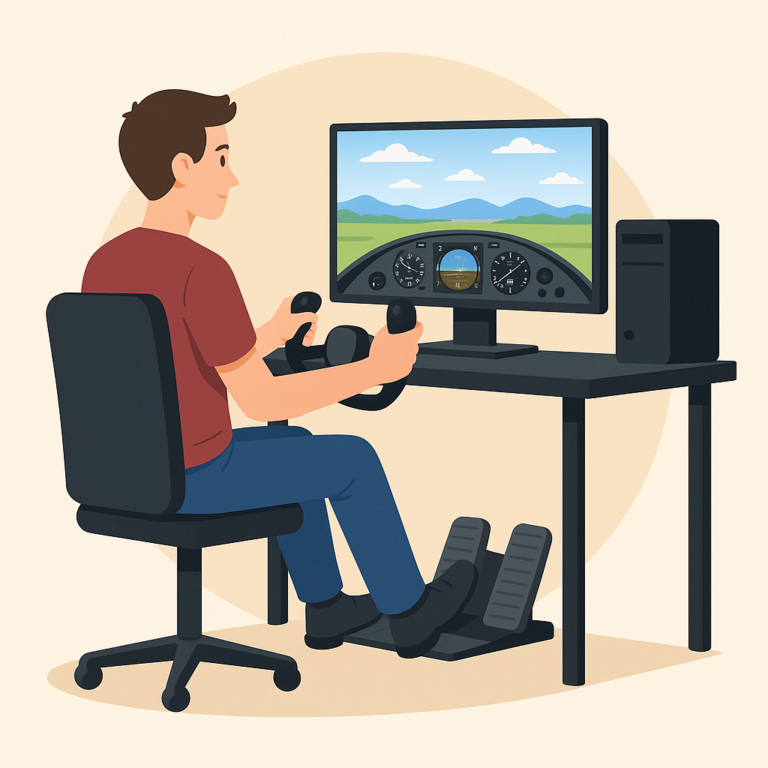
Getting your equipment setup right is like preparing for a journey—the smoother the start, the better the adventure. Your computer is the heart of your flight sim experience. A powerful CPU, a robust GPU, and a healthy chunk of RAM are your best friends here. Without them, lifting off might feel more like you’re dragging through mud than soaring through the skies.
When it comes to controls, starting simple is key. The keyboard and mouse might not give you the full cockpit feel, but they’re your starting runway. As you gain confidence, it’s worth considering an upgrade. A joystick or yoke can transform your whole experience, turning it into something that feels remarkably close to the real deal. Adding rudder pedals into the mix only increases that immersion, letting you handle your plane with the finesse of a skilled aviator.
Remember that your setup doesn’t have to happen all at once. Make the initial leap with what you’ve got, and gradually enhance your gear as you delve deeper into the flight experience. You can also check out how to set up your first custom flight simulator for even more immersion. This gradual approach helps you appreciate every upgrade, transforming them into milestones of your virtual piloting journey. Stay flexible, upgrade when you’re ready, and enjoy watching your setup grow along with your skills.
Mastering the Basics of Virtual Aviation

So you’ve got the simulator set up and your equipment ready to roll—great! Now comes the part where you actually learn to fly. Start small by getting familiar with your cockpit. Once you’re feeling comfy in the cockpit, it’s time to get those wings in motion. Basic flight maneuvers are your foundational skills. Taking off might feel like a giant leap, but steady climbs, smooth turns, and gentle landings come with practice. Remember, it’s not just about getting up there; safe and controlled descents are equally important.
Navigation is another key skill in your virtual piloting toolkit. Before diving into advanced flight paths, it helps to understand the basics of aerodynamics in simulators, which influence how your aircraft handles in the air. Start out with Visual Flight Rules (VFR) to get a grip on using visual cues for navigation. It’s like using landmarks in the virtual skies. After you’ve got that down, you can step up your game with Instrument Flight Rules (IFR), which rely more on cockpit instruments than what you see outside. Tackling both aspects will round out your skill set and prepare you for more advanced challenges ahead.
Engaging with the Flight Simulation Community
Connecting with fellow enthusiasts is an essential part of the flight simulation journey. This community can be a goldmine of tips, advice, and shared experiences that enrich your virtual flying experience. Whether you’re unsure about tackling turbulence or just want to avoid the common mistakes new flight simulator users make, connecting with others is one of the fastest ways to learn.
Forums and social media groups are fantastic starting points for finding your crew. These platforms often host lively discussions where you can ask questions and share your triumphs and challenges.
✈️ AVSIM Forums – One of the largest and oldest flight simulation communities online.
🛩️ VATSIM – For realistic online flying with live air traffic control.
Besides, joining group flights opens up opportunities for collaborative flying experiences, letting you team up with other pilots for missions across this virtual world.
Getting involved in this community isn’t just useful—it’s fun as well. Shared experiences and group activities can lead to fresh insights and ideas, making the sim experience more rewarding and less of a solo endeavor. Engage actively and soak in the wisdom and camaraderie that come from sharing this passion with others.
Looking for a place to start? Head over to our flight sim community guide to explore trusted forums, active groups, and tips on making the most of your sim network.
Don’t forget—flight simming is way more fun when you’re not flying solo. Tapping into the community not only boosts your learning but makes the whole experience feel more alive and engaging. It’s an invaluable resource that most pilots cherish, a special space where the nuances of flying come to life beyond the virtual cockpit.
This is an excellent guide for beginners stepping into the world of flight simulation! It captures both the technical and emotional aspects of starting out—something many new sim pilots overlook. The breakdown of different simulators is especially helpful; I remember feeling overwhelmed by all the choices at first. Starting with a Cessna was a game-changer for me, and it’s great advice for anyone wanting to build a solid foundation. I also appreciate the encouragement to take things slow and not rush the process. That mindset really makes a difference in staying motivated. The emphasis on community involvement is spot on—forums and group flights helped me learn so much more than manuals ever could. Whether you’re into hyper-realistic visuals or want a fun flying experience, this article offers something for everyone. It’s a great reminder that progress in the virtual skies is all about patience, curiosity, and enjoying the journey.
Hi Andrejs!
I’m glad the guide resonated with you. Starting with a Cessna really does make the early learning curve smoother, and taking things slowly is the best way to stay motivated. The community aspect is huge too — you can learn so much faster when you’re not flying alone.
Getting started with flight simulation was a game-changer for how I appreciate aviation. In the beginning, I underestimated how much there is to learn, from reading instruments to managing flight paths, but sticking with it made each new skill feel like an achievement. In my experience, having a checklist and sticking to basic procedures early on helps prevent feeling overwhelmed. I believe that focusing on realistic habits from the start makes the entire experience more immersive and satisfying. It’s not just about flying from point A to B, it’s about understanding every step along the way.
Hi Slavisa!
You’re absolutely right — there’s a lot more to flight simming than people expect at first, and every new skill feels like a win. Sticking to checklists and basic procedures early on builds strong habits and makes the experience far more immersive. It really is about understanding the whole process, not just getting from A to B.
As someone who’s just dipping their toes into the world of flight simulation, I found this guide incredibly reassuring and informative! The analogy of choosing a flight simulator like picking a pair of shoes really resonated with me—it emphasizes the importance of finding the right fit for one’s needs and comfort level. Your encouragement to take things at our own pace and embrace the learning curve is exactly what beginners like me need to hear.
I’m curious—do you have any tips on setting up a realistic beginner-friendly flight sim environment at home, especially for those with limited space or budget? Also, what about suggestions for engaging flight sim communities where beginners can ask questions or even find virtual flying buddies?
Thank you for breaking down the complexities and making the skies feel a little less daunting.
Hi Alice!
For a realistic but budget-friendly setup, a simple joystick and a small desk space are more than enough to start. Communities like AVSIM, Reddit’s r/flightsim, and VATSIM are great places to ask questions and meet other simmers. Taking it at your own pace is exactly the right approach — the skies feel a lot less intimidating once the basics click.
I love how you highlighted both the technical and community sides of flight simulation. It’s so true that the experience is more than just a “game”—the blend of realism, challenge, and exploration really makes it feel like a whole new hobby. Starting out with a Cessna was also my go-to, and it definitely helped me get over the intimidation factor of all those instruments.
I think your point about gradual upgrades is spot on. When I first started, I stuck with just a joystick, and only later added pedals and a yoke—it made each new piece of gear feel like a milestone. And I couldn’t agree more about the community aspect. VATSIM in particular takes the experience to another level once you’re ready for live ATC.
Curious—if you had to recommend just one first upgrade for a beginner (joystick vs. rudder pedals vs. VR headset), which do you think makes the biggest difference early on?
Hi Jannette!
Your first-takeoff story is such a relatable moment — we’ve all forgotten gear or flaps at some point. Starting with a small aircraft builds great control before attempting heavy jets. I usually recommend mastering the basics first, then gradually adding realism like weather or more sensitive systems once you feel comfortable. It’s a nice way to grow without overwhelming yourself.
This was such a fun and encouraging read! I really like how you framed flight simulation as a mix of learning and adventure instead of something intimidating. The step-by-step approach—from picking the right sim, to upgrading gear gradually, to starting with the trusty Cessna—makes it super approachable for beginners who might otherwise feel overwhelmed.
I also appreciated the emphasis on community. Flight simming can feel like a solo hobby, but once you plug into forums or networks like VATSIM, it becomes a shared experience that adds so much depth.
One thing I’m curious about: do you think a complete beginner should jump straight into VATSIM/online ATC for immersion, or should they master offline basics first before taking that step?
Hi Jenny!
Glad you enjoyed the guide! Starting offline is usually best so beginners can get comfortable with handling and procedures before adding the pressure of live ATC. Once the fundamentals feel natural, VATSIM becomes a much more enjoyable and less intimidating next step.